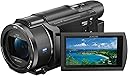
🎬 Own the moment in stunning 4K — zoom, stabilize, and share like a visionary!
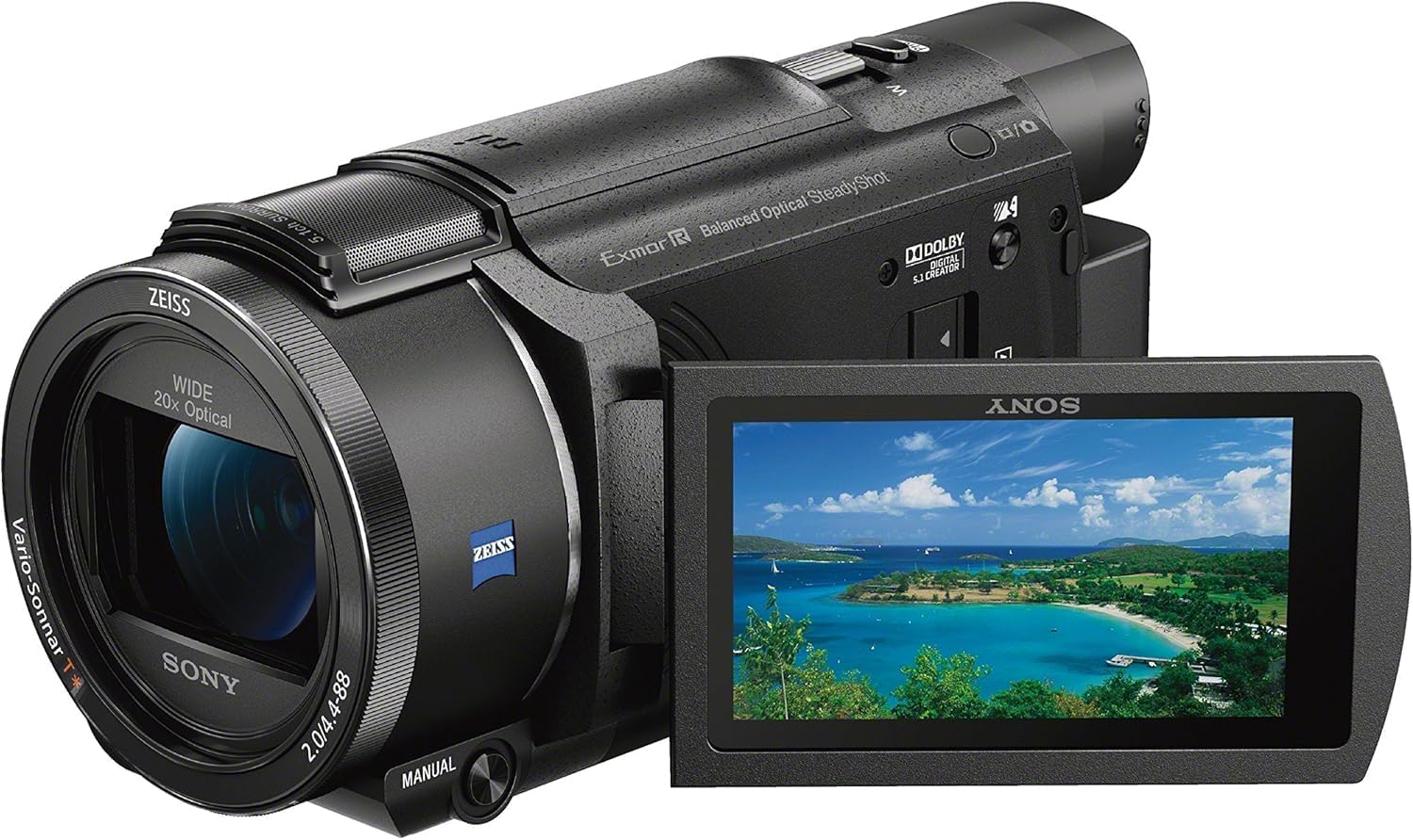
The Sony FDRAX53/B is a compact 4K camcorder featuring a ZEISS 26.8mm lens with 20x optical zoom and 30x Clear Image Zoom, paired with a 16.6MP Exmor R CMOS sensor. It offers advanced Balanced Optical SteadyShot image stabilization for smooth handheld shooting, a 3.0-inch touchscreen LCD with manual focus ring, and wireless connectivity via Wi-Fi and NFC. Ideal for prosumers and content creators seeking high-quality 4K video with versatile zoom and intuitive controls, it includes a rechargeable battery and essential cables for immediate use.


| ASIN | B01950TCEU |
| Antenna Location | Bicycle |
| Are Batteries Included | Yes |
| Best Sellers Rank | #96,100 in Electronics ( See Top 100 in Electronics ) #226 in Camcorders |
| Brand | Sony |
| Built-In Media | AC Adapter, HDMI (micro) Cable, Micro USB Cable, Operating Guide, Power Cord, Rechargeable Battery Pack (NP-FV70), Sony FDRAX53/B 4K HD Video Recording Camcorder |
| Camcorder Type | Action Camera |
| Color | Black |
| Compatible Devices | Personal Computer, Laptop, Smartphone |
| Connectivity Technology | HDMI, NFC, USB, Wi-Fi |
| Customer Reviews | 4.4 out of 5 stars 554 Reviews |
| Digital Zoom | 40 x |
| Display Resolution Maximum | 4288x2408 |
| Effective Still Resolution | 8 MP |
| Effective Video Resolution | 3840 Pixels |
| Features | Time Lapse |
| File Format | XAVC S, AVCHD, MP4 |
| Flash Memory Installed Size | 128 |
| Flash Memory Speed Class | UHS Speed Class 3 (U3) or higher |
| Flash Memory Type | SDXC |
| Flash Memory UHS Speed Class | UHS Speed Class 3 (U3) or higher |
| Flash Memory Video Speed Class | V30 or higher |
| Focus Type | Auto Focus, Manual Focus |
| Form Factor | Compact, Handheld |
| Global Trade Identification Number | 00027242895638 |
| Has Image Stabilization | Yes |
| Image Aspect Ratio | 16:9 |
| Image Capture Speed | 60 fps |
| Image stabilization | Optical |
| Item Dimensions D x W x H | 7.44"D x 5.91"W x 4.25"H |
| Item Weight | 2.5 Pounds |
| Lens Type | Zoom |
| Log Gamma Curve | S-Log2 |
| Manufacturer | Sony |
| Maximum Aperture | 1.8 f |
| Maximum Focal Length | 26.8 Millimeters |
| Minimum Aperture | 1 Millimeters |
| Minimum Focal Length | 4.4 Millimeters |
| Model Name | Sony FDRAX53/B 4K |
| Model Number | FDRAX53/B |
| Number of Batteries | 1 Lithium Ion batteries required. (included) |
| Number of Speakers | 1 |
| Optical Zoom | 20 x |
| Photo Sensor Size | 16.6 |
| Photo Sensor Technology | CMOS |
| Screen Size | 3 Inches |
| Sensor Type | CMOS |
| Shooting Modes | Manual, Shutter Priority |
| Style Name | Base |
| Supported Audio Format | MP3, AAC, WAV |
| Supported Image Format | JPEG |
| UPC | 027242895638 |
| Video Capture Format | 4K, HD |
| Video Capture Resolution | 4K |
| Video Resolution | 4K |
| Warranty Description | 1 year coverage for labor, 1 year coverage for parts |
| Water Resistance Level | Not Water Resistant |
| White Balance Settings | Custom |
| Wireless Compability | 2.4 GHz Radio Frequency |
| Zoom | Optical |
L**T
From a Storm Chaser and Sports Videographer
First of all, I am a severe weather photojournalist, thus my primary reasoning for this camera is to shoot storm and weather video. I have also shot high school football games with this camera, and both types of videos have been used on TV. That said, I am reviewing this from that perspective. General thoughts, I love this camera. For many years, I have been shooting on the Sony XR500v models (HD) that I swore by, mainly because of their low-light capabilities and the quality they rendered out, even if I was just using headlights as my only source of light at night. I finally graduated 4K, this being my first go, and after a month, I have to say that I love what I am getting. One of the bigger initial reasons for buying this was because the batteries from my XR500v models were the same as what this camera uses, so I was able to keep all my accessories the same without any further investment. WEATHER VIDEO: I have shot in daytime, low light (cloudy or stormy conditions), and at night, and all three look terrific. The quality is outstanding, the low light and nighttime videos turned out great. One of the notable differences between the XR500v and the AX53 at night was that while the AX53 was not as bright as the XR500v (slight difference, but noticeable), it had much less noise and was much cleaner. The details on this camera are great, colors are bright, and while the 4K is great for building a library, I render out clips in 1080 and they look outstanding. FOOTBALL VIDEO: Shooting under the Friday Night Lights, I love this camera. It focuses well and easily, very quick, and handles the action very well. Lower light situations mostly, and the clips look crisp and sharp. Have even done interviews on the fly and they sound good even on the built-in mic, so that's a perk for that (I'd use a more professional microphone system for more formal interviews). You won't get professional sound from this, but I feel like it rates higher than most built-in sound on cameras, so for most, I think it'll work just fine. TECHNICAL: I LOVE the focus ring... one of the things I loved about the XR500v was the ability to adjust the focus on the camera using a knob as opposed to going into the menu. This is super handy for me and allows me to set this camera to infinity very quickly without having to access menus. Note that you can turn the focus to auto/manual via a button that is easy to access beneath the ring on the left side. The position of the photo button has lead me to inadvertently shoot photos when using the zoom toggle, and I have done it a lot while picking up the camera, etc. That is slightly annoying, but hardly an issue overall. The image stabilization is terrific when hand-holding (which I shoot 90% of the time using this camera), but on a tripod, you need to let it settle a bit or your image will float a bit. But it is smooth when using by hand, or in a moving car. It is even very stable when at full zoom. DUAL-SHOOTING: This camera is capable of shooting 4K as well as 720 video at the same time. My station uses 720, and having compressed 720 files immediately available makes for a very quick turn around. The file sizes are small, but the quality of the video is noticeably low, but will suffice in a pinch. It is extremely handy for me to have that feature. But in most cases, I will not substitute the 720 files for the 4K files in my edits, only using them for mobile uploads cause of small file size, or for quick turn around in tight deadlines. ADVICE: Get a UV filter for the lens just to keep it safe from scratches. And you likely will not find a hood you can use at full wide because the lens shoots so wide, it will get the hood in the shot. MEMORY CARD: I use a Transcend Class 10 card at 128GB and have had no issues with it in dual record. BATTERY: I have a FV100 on the camera and it sticks out a lot. The tab that holds the battery in place does the job, but definitely feels small and breakable (have not broken it on this camera, but it just has that not-so-stable feel). Be weary of that if you're using extended batteries. The FV70 will probably work fine. The FV100 also makes it hard to use the viewfinder to shoot if you use that method. I have shot two hours of football on the battery and have had plenty of time left. I don't have an exact, nor am I shooting continuous (10-second clips), but I feel confident in saying it will last you a couple hours easy. COMPLAINTS: The position of the photo button will probably give you a few accidental photos, but again, more of an annoyance than anything else. I'm not a fan of having to flip open the LCD screen to turn on the camera because the card access is located behind the LCD, so I get into the habit of manually turning the camera off before taking out or inserting the card. That manual power button is also behind the LCD screen. Again, as mentioned earlier, use of the FV100 extended battery virtually renders the viewfinder a bit tougher to use. It can still be used, but the battery sticks out further than the viewfinder, even when it is pulled out. BTW, pulling out the viewfinder also turns the camera on. VIDEO EDITING: Post-processing 4K files is very hardware intensive... my laptop I edit on needed at least 8GB of RAM with a stout processor. I use Premiere CS6, and originally had 4GB of RAM which was terrible for editing. The upgrade helped immensely, but still is a bit lagging in areas. My desktop is loaded and edits beautifully. Just make a note of that if you plan on editing much. OVERALL: I love this camera and am happy I made the investment. My XR500v camera have lasted nearly 8 years, and still going (the only reason for the upgrade was to get into 4K). My hope is to get a lot of life from these babies as well. Strongly recommend for anyone casual looking to shoot, but certainly would not stray away from doing some semi-professional stuff with it as well.
B**R
great intro to 4K shooting with fantastic image stabilization
Came for the 4K, stayed for the stabilization! The Balanced Optical SteadyShot (B.O.S.S.) image stabilizer on this thing is phenomenal for handheld shooting, best I've ever seen. Supposed to be slightly better in HD mode than 4K, but I didn't notice a significant difference. You can walk while shooting in wide angle, or zoom in all the way while standing still, and get usable to great footage -- no tripod necessary. Of course, you can't do swish pans and fling the camera around and expect miracles, but if you at least make an *attempt* to help it out by smoothing and dampening your motions or bracing yourself (like any decent cameraperson would), you can get unexpectedly great results. Yes, the AX100 has the much bigger 1" sensor. But that model is now about 3 years old and about $700 more, while this camera has the very latest (2016) vastly improved optical stabilizer technology. Since I'm shooting lots of handheld documentary footage, often in remote locations with only occasional tripod shots, I opted for the better stabilizer rather than the bigger sensor and am VERY glad I did. Requires a fast SDXC card -- I used this SanDisk Extreme Pro 128GB UHS-1/U3 card with no problems: SanDisk Extreme PRO 128GB UHS-I/U3 SDXC Flash Memory Card with up to 95MB/s- SDSDXPA-128G-G46 . You can fit about 2.5 hours of 4K @ 100mbps in XAVC-S mode on this card, more than double that for only HD resolution. I can report that the XAVC-S video from this camera works GREAT as-is when imported directly to iMovie 10.1 or greater on the Mac. I was pleasantly surprised -- you don't need a top-of-the line machine for basic 4K editing, my 2012 MacBook Air with an SSD does OK, and anything newer with an SSD should be even better. You do NOT need any scammy 3rd-party XAVC-S transcoding software, which you will find plenty of links to if you are googling around for AX53 and XAVC-S. I just mounted the SDXC card in my computer, clicked Import in iMovie 10.1.2, selected some clips, and could start viewing and editing them right away. The 4K video looks GREAT on a calibrated HD monitor and TV downscaled to 1080p. Update: finally got the chance to view it on a large calibrated 4K monitor, and yes you really can tell the difference; you don't perceive it as 4x more detail, but finely textured areas definitely seem more lifelike and tactile than in 1080p. The camera has some features for transferring video wirelessly, but that looked like a lot of trouble to me. I like simple things: just pop the card out, and stick it in your computer. Reading reviews, people kept complaining about two main things with this camera: not enough manual controls, and some kind of "bug" with the stabilizer when shooting on a tripod. Actually, I really like the Manual button, you can use it to choose which ONE of about 6 settings the lens ring controls, and you can do that from just the viewfinder (no touchscreen necessary). I wish I had 3 manual buttons like you do on the AX100, but I'll live. I also used the "My Button" feature to put 3 quick-access "soft buttons" always on the left side of the touchscreen: White Balance, Spot Focus, and Audio Rec Level. That's enough to remind me to take care of those things before every shot. As for the stabilizer "bug", I didn't see it. For moving shots on a tripod (live panning and tilting with a fluid head) you want to turn SteadyShot off, otherwise it will fight you -- same with any lens that has optical image stabilization. But for locked-down tripod shots I didn't bother turning SteadyShot off and didn't notice any problems. Focusing system is fast in reasonable light -- when picking a target on touchscreen (Spot Focus), it goes from infinity to a foot away in less than a second. When in auto-focus mode and moving around, the camera actually takes its time and waits for things to settle down a bit before selecting a target, which I liked. When shooting, I start out by putting the camera in "full auto" mode with the little "iAuto" icon on lower right of screen (SONY calls it "Intelligent Auto"), which resets everything to auto while the camera tries to figure out a scene mode, exposure, shutter speed, etc. Then if necessary I make a few manual changes: white balance (using a white card), focus (using touchscreen or manual dial), and sound level. I observe the on-screen guides for Focus Peaking and Zebra Stripes. If I see too many zebra areas, I press and hold the Manual button for a second, pick the Exposure setting in the on-screen menu, and dial it down a little. That's about it -- but for quick run-and-gun the camera does a surprisingly good job when in iAuto mode, even in low light, and always with that great stabilizer. I use external mics exclusively, and the audio quality has been excellent: Rode VideoMic GO (powered by camera) or Rode Wireless Filmmaker Kit (transmitter, receiver, and lapel mic). I love the Time Lapse feature -- but unfortunately it stores the frames as individual 4K JPEGs rather than a movie, which means you have to use external software before importing to iMovie or whatever. I use the free Mac app called "Interval" (from the App Store) - pick an input folder with all the frames, pick your output settings, export as 4K QuickTime movie, then import that into iMovie. You don't need the SONY PlayMemories Home software for ANYTHING. This is a great hobbyist/prosumer camera for getting into 4K/UHD shooting, small and lightweight, feels very comfortable in your palm for on-the-go situations, and can yield amazing footage with a little care.
W**S
The Perfect All Purpose Camcorder for Individual or Organization/Church
I waited 3 years to write this review as I wanted to be sure anything I said I could feel certain was a constant. I have used it for photo/still as well as ultra low light to bright sunlight, indoors/outdoors and using all 3 available mode settings and testing all functions including stabilization under normal and semi extreme circumstances. Personal events, Church events, Weddings, etc., totally out performed my Canon in every test. I used a formatted 256 GB SD Card (FORMAT IN CAMERA NOT A COMPUTER, etc). and quality in all 3 modes was amazing. Whether converting to/from 4K/1080/720/480 with a good converter program there is no graininess to speak of and DVD's are stunning on a good DVD Burning program. I would say everything is absolutely a positive BUT if you use a line in or Mic connection DO NOT set AUDIO as AUTO. The on board amplifiers over boost and you get that hum/hiss. I found setting it just slightly before 1/4 audio and manual worked well and you can listen with headphones/earbuds to quality. The on board Mic works extremely well and on a par with the Canon with an external Mic. While it has both 2 channel and 5 channel audio recording, ONLY the lowest setting is 5 Channel capable. The camcorder is very user friendly and the on board menu is very smooth and built in monitor is quite clear in all lighting conditions. My Canon lasted 2 years as our primary video taker but doing things like black light recorders left much to be desired and why after much research we opted for the Sony and here 3+ years later not a single regret. We also got a 6 Foot Tripod and the camcorder works well on that platform and with Steady Shot on Standard, walking around and doing a video is nice and stable with minimal bounce. Setting Steady Shot to Active you can walk, do rapid turn and scans likewise the real world effect versus bobbling and shakes. Whether for personal use, Church, organization....the quality of the camcorder and output is hard to beat without spending double the price or more.
K**I
Better than the Competition
This is a fantastic camera. I don't have a lot of experience with camcorders but this one is amazing! That being said I won't bore you with tons of technical talk as that has already been done. I researched quite a bit, as I usually do, and compared as many samples as I could. There are 3 things that led me to this camcorder over the competition. Image quality. It is amazing. Crystal clear. I opted for the 4K over comparing HD models because I wanted to future proof. At least best as I can. If I'm going to spend this much money I don't want to feel like it's obsolete in a few years. As 4K displays are becoming more prevalent this camera will ensure that I will still have the best image quality for years to come. Stabilization. Again amazing. the Boss system cannot be beat at the time. It's almost as the camera is sitting on a professional gimble that cost thousands. Color temperature. Called white balance in DSLRs. Not sure what the tech term is for in camcorders. This camera produces the truest color replication without having to do any post processing. At night it does seem a little cool but the Panasonic seems just a little too warm during the day and that's when I figure I will be using it the most. Yes there are many other things that make this a great camera but you can read about touchscreens and menus elsewhere. These are the things that were most important to me and this camera excels in all 3 over the competition. If you are considering this camera buy it. It was a few hundred more than I wanted to spend but I'm glad I did.
L**L
I tried to like this camera but it failed miserably at being just an acceptable video camera.
Well, in a few word I am very disappointed with this camera. I purchased this camera to film lectures and other various general activities. I have not owned a new camcorder in the better part of 15 years. My last camcorder was a Sony TRV-900 still love that camera however the DV tape drive has started having issues camera side still works flawlessly. Aside from being standard definition video its still one of the best camcorders ive owned. This FDRAX52/B on the other hand has got to be one of the worst cameras I have ever owned. I wanted to like this camera so first the positives, it feels like it is quality built and in a very small package. I really like the direct to digital recording onto an SD card, coming from DV tapes this just makes sense. I like the lense shutter guard as well as the auto stabilizing lense works very well and really improves the steadiness of your video images. And that is pretty much where the positives end. Now for the negatives. First off this camera has a very difficult time focusing. At first I thought it just must be me and how I would zoom in on objects but as I would zoom in they would go out of focus very quickley and I would hae to zoom back out and then try to zoom in very slowely and sometimes they would stay in focus and the others it would go out of focus halfway through the zoom range and at full zoom would finally refocus. The camera has a very difficult if not impossible time focusing on bright backlit objects such as a TV, Slide projector, computer screen etc. Just will not focus on the screen at all and if you cannot zoom to make the screen full screen what is the point of the camera. In case anybody reading is wondering if it is the digital zoom no I always have digital zoom turned off. I then attempted to put the camera into manual mode to try and overcome the short comings of the auto focus and much to my shagrin the camera still cannot focus on the screen. it as if the lense sometimes is in the right position but then falls into a bad position I dont know but my TRV-900 never had these problems. Next big thing I dislike about this camera is really the lack of settings that the user can access and take over manual control. I also found the battery life of stock battery to be a pathetic 1.5 hours of continuous recording time perhaps the battery being shipped to me completely dead as in not even able to keep the camera on for a second was part of the problem I dunno. I am very disappointed with the lack of accessories Sony includes with the camera as well. Not to keep bring up the TRV-900 but it came with a remote control, lens hood, floppy drive to record saved images to, DV tape and a charger that can charge the batteries externally as well as power the camera through a cable. This camera came with just a power cord to power the camera that's it you have to purchase all the other stuff separately and its not like this is a super budge camera its 1k dollars perhaps I should have known this going into buying the camera and I could over look it if performance was awesome. Next thing they do not tell you about this camera is that if you are shooting video in 4k which why would you not want to if you bought this camera at least that Is what I was thinking you can only record audio in stereo sound not the 5.1 channel audio that they advertised as such a great feature. You have to drop down to HD if you want to have 5.1 ch audio. So as I mentioned I wanted to like this camera and gave it many chances to prove itself however when I missed filming a lecture that I had paid $1800 to attend and flew half way across the country for I was more than a little irritated that the camera ended up being so terrible. I ended up simply using my samsung S7 cell phone which performed far better than this dedicated video camera could. So with regret I am sending this POS right back to amazon so they can send it back to Sony and tell them to get it right. Oh I also did a firmware update on the camera in hopes it would fix the issue to version 1.02 but it is still terrible after the firmware update. My advice avoid the AX53 and perhaps look at other brands or Sony's higher level pro camera albeit they get a lot larger physically. I am in search of another almost prograde video camera in the package size of roughly the AX53 that is pretty much what the TRV-900 was most of the pro features in the package of a consumer grade camera one of the best products sony produced.
X**2
Perfectly balanced set of features for *ITS* category & price - can't be beat.
Quick'n'Dirty SUMMARY (pending a later proper edition): Discounting features that are beyond the scope of the AX53's category/price, like multiple lens adjuster rings, and fast focus at max stabilization, the AX53 is without peer. Its only competitor is its discontinued predecessor, the NX30, with its superb XLR handle audio mixer and a really cool but totally gimmicky LED projector, but, even used, the NX30 still runs 2x more money! The icing on the AX53's cake is its gyro gimballed focus cage (Sony's "BOSS" system) which only exists on 2 other Sony models in this category and NOT at all in other brands. Despite those who think other units w/o a gimballed lens (like the pricer NX80) are great "run and gun" cams, well, they DEFINITELY have not experienced a B.O.S.S. cam. I can only suggest they try an NX30 or AX53 before making such a judgement. This model truly is a Run'n'Gun cam --- Rock steady whilst standing, quite steady whilst walking, usably steady whilst trotting, and acceptably steady whilst running. It seems the judgement of such things is swayed by a huge demographic that thinks cellphone videos are good -- complete with constant inane jerking. What I call nominally steady is the limit of axial skewing you get with a 20-30lb shoulder mounted pro camera. To wit: Not being readily noticeable that its not on a tripod. Well, the Sony BOSS units perform THAT well! BOTTOM LINE: For me, there are simply no other choices under $1K. The menus are a good blend of options, touch screen, and logical layout (for Sony) - unlike the terrible blend of the same things on the much pricier NX80. Ps. Low Light: Ah, then there's the low light performance with its small sensor and F2.0 aperture. It is very good unlike the NX80 with a large 1" sensor but VERY slow F2.8 aperture. The theory is that a larger sensor with the same resolution as a smaller one, has larger pels (sensor elements). The larger the pel, the more photons it might catch. However, with a much slower F2.8 aperture and a higher resolution (smaller pels), you lose that effect and it ends up FAR worse. To compensate for this shortcoming, the NX80 ramps up the video gain 20x or more to achieve what the AX53 already does. So, this "little brother" handily outperfoms the NX80 in low light. NEGATIVES: Of course such a low price, there are negatives. There always are some at ANY price! Some fault the single lens control ring and lack of total manual mode. But neither do other units at the same or lower price! On my absolute quality scale, I'd give it a 3/5 stars. On my realistic scale which is weighted to compensate for the limits of what is being manufactured in the same price class, I give this unit 5 stars w/o hesitation. Will it work for YOU? I can't answer that and I am sure it won't for anyone requiring features it, and its siblings, simply don't have. Nothing you can do about that! Just know this unit has a great blend of features, value, usabillity, and best of breed stabilization. That's all for now, Stay tuned for a proper eval at a later date. ~ fin~
K**.
A great camcorder for recording family vacations and special events!
I purchased this camera to record a family vacation to Disney World. I practiced with it for about two weeks before the trip and I used that time to familiarize myself with the camera. During these two weeks I was disappointed. I wanted much more manual control of the video than it was giving me. With this camcorder, you are able to manually set shutter speed or iris ( which is the same thing as aperture for those of you who know about still cameras), but not both. Whichever of those two you don't set manually is adjusted automatically. Furthermore, the gain (similar to a camera's ISO setting) is not controllable. The best you can hope for on gain is to set a maximum gain amount above which the gain will not auto-adjust. So be aware that this camcorder has very limited manual control; it's mostly automatic. That all said, I took this with me on vacation and overall I was pretty happy with it. In fact, it probably is better that I couldn't mess with those settings because it would have distracted me from what I was recording, and no doubt I would have messed things up considerably on some shots. Usability of the camcorder I rate as good, not great, because of the difficulty with the small touch screen and menu structure. Disclaimer: I still don't have a 4k monitor or TV, so I haven't seen the video in full blown 4k (3840 × 2160). I have seen the video on my Surface Pro 4 (2736x1824) which is higher than HD and the video does look very good on it. One thing that bugs me is that when recording in the bright sun the shutter speed was often 1/250th of a second (or higher in many cases), and that gives the video an unnatural sharpness and judder that I don't like. Normally you want the shutter speed to be twice the frames per second setting to get a natural looking blur. However, the advantage of the fast shutter speed is that you can pull out of the video very sharp images. I did this right as my wife was getting soaked on Kali River Rapids and it is an awesome still image! Anyway, a built-in Neutral Density (ND) filter option would give this camera better (more natural blur) bright light performance. I wish it had one. The manual ring can be assigned to several different functions: [Zoom] [Focus] [Exposure] [IRIS] [Shutter Speed] [AE Shift] or [White Balance Shift]. I did use the ring often in AE Shift mode. For example, when my daughter was meeting a character outside the background was very bright (over exposed) and the subjects were dark (under exposed). Well I don't care about a blown out back ground, so I would enable the ring and dial up the AE Shift so that the subjects are brighter. The shift range is only -1 stop to +1 stop. This range was *almost* always enough; I wish it went to +/-2. (BTW, there is an Auto Back Light feature that I always had ON, but I couldn't speak as to if it really did anything. It didn't seem to be all that helpful.) Bottom line: This is a great camcorder for anyone who desires a simple, 4k capable camcorder that doesn't need to be told what to do. It is not a great camcorder for anyone who wants full manual control over settings. There are definitely more things I can list that I don't like about the camcorder than things I like, but in almost every case the negative things are more or less small gripes. Overall the camera excels at what I needs to do and that is record great quality video. Things I like: - Taking a photo during a video does not stop the video (like what happens on a DSLR camera). - The camera is small and lightweight. - Voice canceling does a good job muffling (not silencing) the camera man, though I never used it on the trip except to test it out. (This function was given a physical button; you may use it, I never did.) - I *think* the "logic" behind the auto exposure does what I would want it to do. ○ That is, in bright conditions it appears that it tries to keep the shutter speed at twice the frame rate by adjusting aperture (or iris as it is referred to) until it can't be adjusted further before adjusting to a faster shutter speed. But it will take the shutter speed to a very fast setting to keep a reasonable exposure in your recorded scene. ○ In dark conditions is behaves similarly. The shutter speed will be set to twice the frame rate and the iris is opened fully, and then gain (similar to ISO) is adjusted up to the max allowable (perhaps set by you using Auto Gain Control). I never observed the shutter speed dropping to slower than twice the shutter speed. (By that I mean if recording at 30 fps, the shutter speed wasn't ever slower than 1/60th of a second. This keeps the video from being too blurry when motion happens.) - The rotating/flip-out display is great. Lots of cameras have this now so no big deal here. It was easy to flip it around for selfie mode. - I didn’t take many still photos with this camcorder, knowing that I can extract stills in post-production. But when I did it was nice to have the button right on top next to the zoom. Easy to press without missing a beat on the video recording duties. - The camcorder's stabilization system is really amazing. I HATE shaky video and it was really minimized with the system in this camera. I've seen a some of criticism about this camcorder because of not having the Intelligent Active image stabilization available in 4k, but the Active mode works in 4k and that coupled with the physical vibration-reducing mounting of the lens within the camcorder body still does a really great job. - I only used the wifi capabilities once… after my wife and daughter got soaked on Kali River Rapids they went to the bathroom to dry off and I had some time to kill so I used the in-camcorder editing to view the point where they got soaked, create a couple still images of the event, connect my phone to the camcorder, and transfer the stills to my phone. I then sent the stills out to friends and family. It was awesome. I only wish the 4k wasn't limited to 30 fps, because this video would have been awesome in slow mo. Things I don't like: - The display is very glare prone and reflective. There is a normal and bright setting in the menu, and if your environment is bright you'll want this to be in bright mode for sure. Changing between the two is a bit of a pain as you have to go deep into the menu to do it. - The display is small and it is hard to hit the right button on the screen. I very rarely used the three custom buttons you are allotted, partly for this reason. On several occasions I pressed the wrong one… not the end of the world but something to keep in mind. - Interface is too difficult to navigate. Example: It takes 13 "taps" on the screen to turn the focus magnifier on or off. - The viewfinder only works when flip-out display is closed. And when it is closed you can't change any settings other than the one setting assigned to the adjustment ring. - Viewfinder is difficult to use if the extended battery is used because the battery sticks out so far. - I only used the viewfinder one time, when I was on a dark ride and didn't want light emanating from the flip-out display to distract from the experience for other riders. - When zoomed and medium-to-low light, auto focus had a really hard time (using firmware version 1.01). Even when using spot focus and touching the item it still would not focus on it. Had to totally reframe to get it to focus on what I wanted. - It is not easy to control basic settings like shutter speed, iris, or gain, and you can only choose one to manually control at a time. The other two will adjust automatically and there is nothing you can do to change that. - You have to initiate manual control of a setting (shutter speed or iris) to see what it is. Why is this not shown on the screen at all times? Very frustrating. The camera really should have an option for this info (along with gain) be shown on the display at all times. - No custom shooting modes. I would have loved to have the ability to define a custom mode for {4K, 30 FPS, 60 Mbit, 1/60 shutter speed} and another for {HD, 60 FPS, 1/120 shutter speed}. - The door/cover over the microphone line-in and micro USB port opened on me frequently without me intentionally doing it. - It takes several menu selections and few seconds to switch between 4k mode and HD (1080p) mode, and then an unnecessary tap on the OK button to dismiss the window telling me it completed switching modes. Seems like this should be easier to do. - I hate it that you have to have the battery in the camera to charge it. I bought extra batteries and a travel charger and that helped. - The lens is variable aperture from F/2.0 (wide) to F/3.9 (20x zoom). I wish it had a fixed aperture through the full zoom range. This is something to keep in mind when recording in low light especially, as more light will be available to the sensor at wide angle. - BIG GRIPE. I didn't realize this until after returning home. Every time I formatted the card, file numbering reset at C0001. In the camera settings you can choose "Series" or "Reset", and I had "Series" selected. I'd expect the number to just keep incrementing even after formatting the card, but that's not what it does. Perhaps this is a bug in the firmware? Not sure. I had to download a file renaming utility to get these names straightened out - a real pain in the neck. (BTW, at the end of each day I copied the SD card contents to an external HDD using a card reader; I did NOT use the PlayMemories software or transfer directly from the camcorder using the USB cable. Also, I'm planning on doing all my editing using Adobe software, not the included PlayMemories from Sony.) Be aware of the following: - If it is very bright out, the aperture (iris) will be closed down to F/11. Pretty much everything will be in focus. An ND filter on the front of the camera will be necessary if you want shots with a more open aperture so you can get those DSLR-like blurry backgrounds in bright light. - 5.1 sound only enabled when recording in AVCHD (read that to mean not 4k). For this reason I never used it. Didn't even test it. Wasn't interested in it at all. Sales gimmick? - Digital Image Zoom (250x) looks terrible. It's bad, really bad. - Night shot mode is enabled by physical button on the camera, but the night shot light is enabled within the menu structure. The light does not have much range at all - only a few feet. The night shot mode has a physical button directly above the power button and is the same size and shape. I missed a shot by pressing the power button instead of the night shot button by mistake. - There is no neck strap provided. You will really want a strap of some kind. I used a Quick Release Sling Shoulder Neck Strap and it was AWESOME. - What the heck is Clear Image Zoom (CIZ)? I tried to figure this out and I will explain what I think. I think for this camera it means that the video that will be recorded is using slightly less area on the sensor than it normally would, and thus in order to maintain a 4k resolution some pixels in the final video are interpolated (in camera up-scaling). Essentially it is a type of digital zoom. The remaining portion of the sensor, the area around the edges of the recorded video, is then used to stabilize the image (reduce shake). Note that when Intelligent Active or Active steady shot are enabled that CIZ is enabled as well. My assumption is that with Intelligent Active, more edge area is used for stabilization and thus a smaller sensor area for actual recording, thus more pixel interpolation. Regardless, CIZ seems to do a good job. For my purposes I doubt I could ever tell if it was on or off. Here were some usage tips I made for myself before the trip. You may find them helpful. 1. In low light environment, shoot wide angle to take advantage of the F/2.0 aperture that lets in more light. Hopefully the gain will be lower and thus the video will not be as noisy. 2. Use Low Lux setting for "must-capture" events in low light. The video will be very noisy so don't use it if you don't have to do so. Try night shot if it is very dark vs using the Low Lux mode. 3. For the maximum field of view, use Standard Steady Shot or Off. Intelligent Active or Active will crop in on the image a significant amount. - NOTE: Steady shot will change the field of view quite a bit. It's hard to quantify, but it's like the difference between a 24 mm and a 30 mm focal length on a camera if that makes sense to you. ○ Intelligent Active (clear image zoom will be enabled). Not available in 4k, I'm guessing that this is not available in 4k probably because it would look bad with all the interpolated pixels from CIZ. ○ Active (clear image zoom will be enabled) - has the same field of view as Intelligent Active. This mode is available in 4k. ○ Standard and Off. Both of these have the same FOV, which is wider than the other two options. ○ When switching between 4k and HD the last used steady-shot setting for the resolution is retained. 4. If it is very bright out, aperture will be closed down to F/11. Everything will be in focus. When it is dark the aperture will open up the full amount, you may want to consider turning on focus peeking if manually setting the focus. 5. Steady shot doesn't help small camera "movements", only shake. Keep the camera as steady as possible and don't expect steady shot to work miracles. 6. If Intelligent Active or Active steady shot are not needed, use Standard steady shot. This will keep clear image zoom off. (Clear image zoom which adds pixels to the image.) This ended up being way longer than I expected.
C**R
Excellent Video Camera
I bought this camera to video tape the graduation of my son from UVA. As we all know, I had to video recorded from afar. I did use the zoom feature and it was excellent with incredible clarity. No shaking, especially during zoom up close, due to the image stabilization feature and the incredible 4K image. Wow! I can't tell during the taping but on the play back on a 4k TV it's awesome. The clarity, the colors is incredible. One thing I need to mention, if you zoom up close and turn the camera off and then turn it back on again, the auto focus wouldn't work when I tried to video long distance again. So, a portion of my taping is completely blur. Maybe it's me not knowing what to do. I am new to the camera. So, if you rely on the auto focus, watch out.
Trustpilot
1 day ago
3 weeks ago