


🚀 Elevate your productivity with the dual-screen ZenBook Duo – because one screen is so last decade!
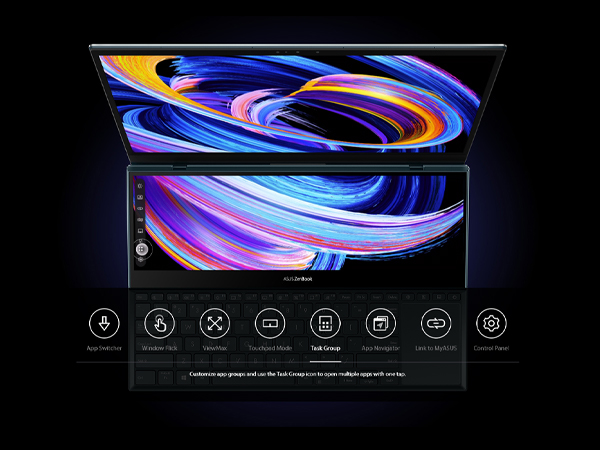
The ASUS ZenBook Duo 14 UX482 is a cutting-edge laptop featuring a 14-inch Full HD NanoEdge touchscreen paired with a 12.6-inch tilting ScreenPad Plus for enhanced multitasking. Powered by the Intel Evo platform and an 11th Gen Core i7 processor clocked up to 4.7 GHz, it delivers exceptional performance and responsiveness. With 8GB RAM, a 512GB PCIe SSD, Intel Iris Xe graphics, and up to 10.5 hours of battery life, this Celestial Blue laptop is designed for professionals seeking speed, versatility, and style in one sleek package.




| ASIN | B08QV5HGHT |
| Audio Output Type | Headphones, Speakers |
| Audio Recording | Yes |
| Audio features | Smart Amp TechnologyBuilt-in array microphoneHarman/kardon (Premium) |
| Automatic Backup Software Included | Windows 10 |
| Available M2 Slot Count | 1 |
| Battery Average Life Standby | 24 Hours |
| Battery Cell Type | Lithium Ion |
| Battery Life | 10.5 Hours |
| Best Sellers Rank | #93,702 in Computers & Accessories ( See Top 100 in Computers & Accessories ) #15,754 in Traditional Laptop Computers |
| Biometric Security Feature | Face Recognition |
| Bluetooth Version | 5 |
| Bluetooth support? | Yes |
| Brand | ASUS |
| Built-In Media | Laptop Sleeve, Laptop Stand, & Stylus, Power Adapter & Cord, UX482EA-DS71T, User Guide, Warranty Card |
| CPU Codename | Tiger Lake |
| CPU L1 Cache | 256 KB |
| CPU L3 Cache | 12 MB |
| CPU Model | Core i7 |
| CPU Model Generation | 11 |
| CPU Model Number | 1165G7 |
| CPU Model Speed Maximum | 4.7 GHz |
| Cache Memory Installed Size | 12 |
| Cellular Technology | WiFi |
| Chipset Type | Intel Tiger Lake-UP3 |
| Color | Blue |
| Compatible Devices | External displays, keyboards, mice, headphones, microSD cards, and other Bluetooth/Wi-Fi enabled devices |
| Connectivity Technology | Bluetooth, HDMI, USB, Wi-Fi |
| Control Method | Touch |
| Customer Reviews | 4.0 out of 5 stars 102 Reviews |
| Display Resolution Maximum | 1920x1080 Pixels |
| Display Technology | FHD |
| Display Type | LED |
| Form Factor | Ultrabook |
| Front Photo Sensor Resolution | 1 MP |
| Graphics Card Ram | 8 GB |
| Graphics Coprocessor | Intel Iris Xe Graphics |
| Graphics Description | Integrated |
| Graphics Ram Type | Shared |
| Hard Disk Description | SSD |
| Hard Disk Interface | Solid State |
| Hard Disk Size | 512 GB |
| Hard-Drive Size | 512 GB |
| Hardware Interface | Bluetooth 5, HDMI, MicroSD, Thunderbolt, USB 3.1 Type A |
| Has Color Screen | Yes |
| Human-Interface Input | Touchscreen |
| Item Dimensions L x W x Thickness | 12.76"L x 8.74"W x 0.68"Th |
| Item Height | 0.68 inches |
| Item Type Name | Laptop |
| Item Weight | 3.46 Pounds |
| Keyboard Description | Chiclet |
| Keyboard Layout | QWERTY |
| Lithium-Battery Energy Content | 70 Watt Hours |
| Manufacturer | ASUS |
| Memory Clock Speed | 2400 MHz |
| Memory Speed | 2400 MHz |
| Microphone Form Factor | Built-In |
| Model Name | ZenBook Duo |
| Model Number | UX482EA-DS71T |
| Model Year | 2021 |
| Native Resolution | 1920 x 1080 pixels |
| Notebook Pointing Device Description | Secondary Touch Display, Touchpad, and keyboard |
| Number of Ports | 4 |
| Operating System | Windows 10 Home |
| Optical Storage Device | No Optical Drive |
| Other Special Features of the Product | Backlit Keyboard |
| Power Device | 65W Type-C |
| Processor Brand | Intel |
| Processor Count | 4 |
| Processor Series | Core i7 |
| Processor Speed | 4.7 GHz |
| RAM Memory Installed | 8 GB |
| RAM Memory Slot Total Count | 1 |
| RAM Memory Technology | DDR4 |
| RAM Type | DDR4 SDRAM |
| Ram Memory Maximum Size | 8 GB |
| Refresh Rate | 60 Hz |
| Resolution | 1080p |
| Screen Finish | Glossy |
| Screen Size | 14 Inches |
| Speaker Description | Built-in speaker |
| Specific Uses For Product | Business, Multimedia, Personal |
| Supported Monitor Maximum Quantity | 1 |
| Total Number of HDMI Ports | 1 |
| Total Thunderbolt Ports | 1 |
| Total Usb Ports | 1 |
| Touch Screen Type | Capacitive |
| Touchpad Feature | ScreenPad Plus |
| UPC | 192876882641 |
| Video Output | HDMI |
| Video Processor | Intel |
| Virtual Reality Ready | No |
| Voltage | 19 Volts |
| Warranty Description | 1 |
| Warranty Type | Limited |
| Webcam Capability | Yes |
| Wi-Fi Generation | Wi-Fi 6 |
| Wireless Compability | 802.11ax, Bluetooth |
| Wireless Technology | Bluetooth, Wi-Fi |
D**G
I think ASUS listened and improved the U482 model over the U481, which was not so bad either!
Hi Guys, This review is after just having the Asus UX482EA, 14”, FHD, i7-1165G7, 8GB RAM, 512 SSD, for two days. I really wanted to have the 16GB version, but that was hard to find. What I wanted to do on this laptop is basic office stuff, Word, Excel, PPT, internet searching. The heaviest work would be reviewing high school football film. A little streaming. I am not a gamer. Pretty safe for the 8GB model. So, I just went for it. I think I was in the mood for something revolutionary. In short, I love this thing! I was debating between the Dell XPS 13” and this one. They have different applications, and I would have been happy with either one. I just wanted something different and not the standard clam shell, open it up and use laptop. This second screen set up is more than a gimmick and becomes particularly useful. The reason why I am posting this is for the external monitor question/answers that were minimal. I was able to hook up a 27” external monitor via the HDMI port. Like I did with my previous Asus Q324u 14”. Windows identified the external as a #3 display (Yeah!). This is great for me for breaking down game film. I have zero complaints really. Just the adjustments like in previous posts. You must move to the left a little bit to reposition for the keyboard and you have to get used to the touchpad on the far right. It is not so much the touchpad, but the left/right “mouse keys” on the far right. I, like most would be, am used to the pad at center point. So, invariably I keep hitting the space bar instead. Absolutely not a deal breaker. I am getting used to it and use a separate mouse anyway. The graphics, screen brightness (almost too bright at max setting), board keys, speaker sound, battery life are more than adequate for me. Also has a USB 3.2, so I do not have to carry a hub with me. But has the USB-C if I do! This unit (again with 8GB) was $300 less than the XPS and I got it in three days. After all the shopping and researching overkill! I'm super happy with this one! Maybe I'm too easy to please? I hope this helps someone out there! 3.31.21 Had this thing for almost 4 weeks. Still love it. Addressing some comments about the hard to see second screen plus or that you have to look over the top. I just found a $10 angled laptop stand on Amazon. Easy fix or adjustment. see added pic. for what its worth. 5.22.21 Update: Still love the thing. I'm with the posts that think the Duo is a fingerprint magnet. To address it, I put on a carbon skin designed for a Dell. Trimmed it down and here we go. Corrects my fingerprint OCD. note: I lifted the "Dell carbon circle". Now I have a teal blue spot on my lid. Just to be different.
R**N
Great PC for college students!
I bought this computer for my son as a high school graduation present for college. He loves the dual screens because he can take notes or work on documents on one screen and have reference material displayed on the other screen. He says it's great for multi-tasking. He likes the light weight and the tilt design that allows for better cooling.
I**Y
Game changer first of its kind
Love the dual touchescreen. perfect for multitasking. you can text and have your phone on the bottom screen or fb messenger or you can use it as a whiteboard. you can have 2 different internet pages open. or you can extend one screen on both screens and it's all very seamless. this tech will only get better, but this is a great start and can't wait to see other companies and laptops start experimenting with dual screens. brightness is good and windows 10 runs perfect. you can swipe from all sides of the screen and each direction has its own function as well. asus and microsoft did a great job with this laptop and it runs very smooth for a gamechanger in design!
J**M
It's Not Bad....I Like it
PROS: ○Lightweight ○Beautiful Color ○Unique and SEAMLESS Duo Touchscreen setup ○Super fast ○A nice battery life ○***Unique Keyboard/Trackpad setup*** ○Infrared Face sign-in ○2 USB-C lightning ports (which seems identically similarly to the macbook) ○Included accessories (a pen, a sleeve, and a stand that sticks under the laptop) CONS: ◇It feels smaller that 14in (that's what she said 😏) ◇ScreenPad not as useful as I thought it would be ◇Not enough ports, had to purchase a USB-C adapter ◇***The keyboard definitely tires your wrist when not sitting upright at a desktop*** ◇SHARP. When using on my lap you feel the divids digging into your thighs. ◇8gigs of RAM (eh, would like more) ◇You still have to slightly lean to see that newly lifted screenpad ◇FINGERPRINTS EVERYWHERE ALL IN ALL, I really enjoy this laptop. It's definitely unique and feels high end. I ran into one hiccup when using a Adobe Illustrator in which it told me I didn't have enough RAM to perform an action. But everything opens so fast which makes it easy to get into a workflow. I prefer using this thing at a desktop, and utilizing the included stand that sticks to the bottom. The keyboard and mouse setup takes a slight getting use to. But when I work on my "work laptop" I find myself placing my hand to the right for the trackpad all the time. My only wish is for ASUS is to PLEASE provide the specs to some kind of custom skin creating site because this thing visibly leaves behind every single touch. More accessories would be nice also like an attachable usb-c hub in that celestial blue color. For this price point, I feel it should be marketed better with more accessories available for it.
C**3
best money ive ever spend
This laptop is literally the best decision and money I've ever spend. I'm so happy I bought this and didn't waste my money on a mac book pro. This laptop has some many more advantages I don't know where to start,lol. touchscreen, 2 screens that you can use separately, superfast, comes with pen unlike the Microsoft, graphics are great, good sound, every type of port you need, super-fast 3d rendering, looks sexy , the only thing I don't like has nothing to do with the actual laptop but more the program , unfortunately it cant connect to your phone if you have a iPhone when trying to pair them on the connect my phone option . Other then that little issue this laptop has not only surpassed every expection i had it shattered them, its gona take a lot to top this baby ...........
A**R
Beautiful and intiutive
I bought this laptop for work and its been great, the dual touchscreen allows for increase productivity, the battery life could be longer but overall a good buy so far. Asus also offers a 90 warranty extention when you leave a review so thats great.
C**T
Everything is amazing but…
Like I said, everything is amazing. Runs great. Very fast and the touch screen is very responsive. My only issue is that the trackpad/touchpad does not work. I’ve tried to update everything and reinstall the driver but it just does not work. But other than that it works amazing.
A**R
Best Asus i ever owned
Such an amazing product! Great laptop from a great company. When it comes to products like this you get what you pay for and this laptop is worth every penny. If your in the market for a laptop that can really help increase productivity look no further!
Trustpilot
1 day ago
3 days ago



