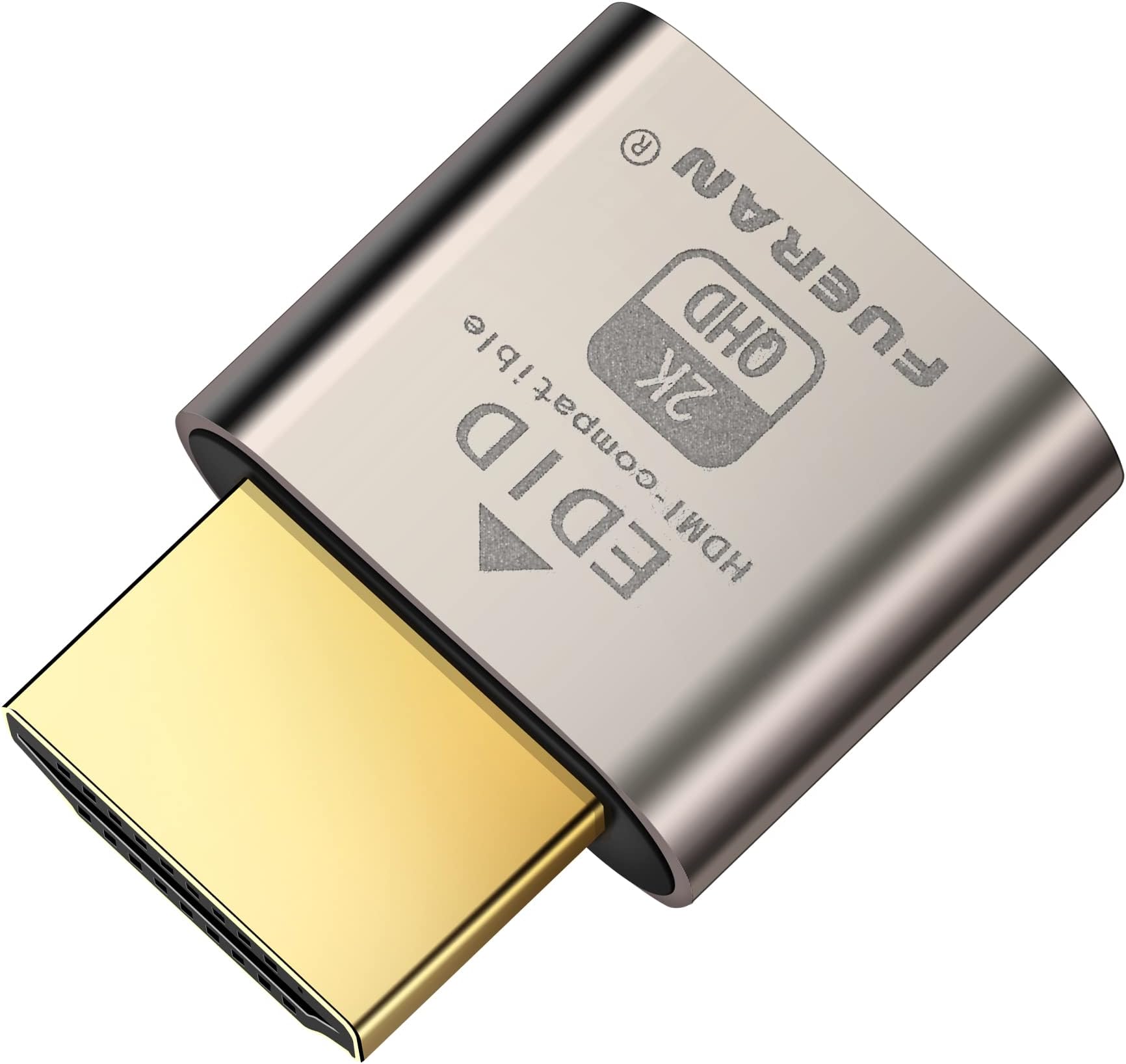
👻 Ghost your display, not your productivity!
The HDMI Dummy Plug Headless Ghost Display Emulator is a plug-and-play device that mimics a real 1920x1080 @ 60Hz monitor via HDMI 2.0, ensuring compatibility with any graphics card and OS. Its ultra-compact design requires no drivers or power cables, enabling seamless GPU acceleration for remote desktops, crypto mining, and headless setups.


D**K
Wow it just works for both video and audio too
This just works, in a complex tech area. Windows will be positive you have a super fast 4K at 120hz display. There are no tricks or weird drivers to install. Any cloud computing software you might use like Parsec, Steam Remote Play, or Steam Link all work 100 percent with this. And so simply, you tell the headless computer to use *this* as its audio output (as if it were speakers) and boom everything just works. The audio caught me by surprise - this acts as if it were a high-end graphics card that has built in audio processing. Fantastic! I had no idea it would so cleanly "just work" for audio issues as well!
E**I
It really works, just no ultrawide or super ultrawide support.
It works as advertised for me. The only issue I have found is that it doesn't support aspect ratios for ultra or super ultrawide monitors. My real display is an ultrawide, and the image doesn't fill out the screen when I access the remote desktop PC. Other than that, I'm getting a full 3840 x 2160 resolution at 120 Hz.
F**K
Works well for remote access to Anydesk
This ended up solving the "waiting for image" issue with Anydesk when there's no monitor connected. I use this with a few mini PCs and they work great.
D**Q
HDMI Dummy Plug 4K120: The Tiny Dongle That Keeps Headless Systems From Throwing a Fit
The HDMI 2.1 dummy plug is one of those rare gadgets that feels like actual witchcraft when you first plug it in—no setup, no nonsense, just instant “yes, absolutely, a real monitor is definitely attached here” energy. For headless systems, GPU nodes, render boxes, or the Mac minis that notoriously sulk when they don’t detect a display, this thing steps in like the world’s smallest therapist and convinces the hardware to get over itself. GPU acceleration kicks in, proper resolutions appear, and the machine stops pretending it lives in 2003. It’s voodoo magic in anodized aluminum form, and it works flawlessly. In real-world use, this particular dummy plug does exactly what it claims: 4K at 120Hz EDID, stable, clean, and believable enough that even macOS buys the illusion without throwing a single tantrum. If you remote into your machines—Parsec, RDP, Jump Desktop, VNC, whatever—you suddenly get crisp rendering, full GPU workloads, and none of the laggy, sad “no display attached” behavior that normally happens. The Mac minis in the lab stop pouting, expose all their proper scaling options, and behave like normal desktop systems instead of headless gremlins that forgot how to draw a UI. As a field tool, it belongs in the same pouch as loopback plugs and tiny utility APs. Anytime you need to simulate a monitor, test resolution pipelines, validate GPU behavior, or run a machine headless without sacrificing performance, this little dummy plug shows up and quietly fixes the problem without taking any credit. It doesn’t overheat, it doesn’t drift, and it doesn’t pretend to be something it’s not. It acts like a perfectly obedient phantom display, and that’s exactly what you need. ⸻ Pros • Instantly enables full GPU acceleration on headless systems • Provides stable 4K120 EDID that macOS and Windows accept without fuss • Makes Mac minis behave normally in lab and remote workflows • Zero config, zero drivers, zero drama • Tiny, reliable, and indispensable for servers, labs, and render boxes Cons • Doesn’t fix GPU driver issues—just gives the system a “monitor” to behave for • Easy to lose because it’s approximately the size and weight of a solid idea • Requires a reboot on some systems to latch the EDID cleanly • Provides no actual display (but that’s the point)
C**S
Cheap way to output custom resolutions
Great way to trick your computer into outputting whatever resolution you need. It can get really hot to the touch when streaming games, but it works well. It's very small, with a good, sturdy build quality. This was well worth its small asking price.
G**B
Works! Great Price
Normally these are not worth the money to me, it’s a dummy plug. That said, it’s a super simple way to tell your headless server, or say Mac Mini, to use a static resolution- no need to find a finicky software or compromise your computers security. They are built solid, fit correctly but not too snuggled, have a low profile with enough space to still easily grab and remove, and being hdmi works with any hdmi compatible computer.
J**N
Is not HDMI 2.1
The dummy plug IS falsely advertised. Here's the proof: What the EDID claims: - ✅ Supports VIC 118: 3840x2160 @ 120Hz (requires 1188 MHz) - ❌ Maximum TMDS bandwidth: 600 MHz The problem: The plug advertises 4K@120Hz but only provides HDMI 2.0 bandwidth (600 MHz), which is half of what's needed (1188 MHz). This is why NVIDIA rejects the mode. For true 4K@120Hz, the EDID would need: - TMDS 1200 MHz+ capability, OR - HDMI 2.1 FRL (Fixed Rate Link) support, OR - 4:2:0 chroma subsampling declaration Your dummy plug has none of these. It's a classic case of misleading marketing on cheap HDMI dummy plugs. Good News for Moonlight: You don't need 120Hz on the host display! Moonlight captures frames from the GPU before they reach the display, so you can stream at 120fps even with the display at 60Hz. Your current setup with 4K@60Hz display + Sunshine configured for 120fps will work perfectly for gaming. Current working config: - Display: 4K @ 60Hz ✅ - Sunshine: Supports streaming up to 120fps ✅ - Moonlight: Can receive 120fps streams ✅
D**A
Perfect for us!
These work great! We have them plugged into a Mac mini farm that we remote into for an application. This allows the screen sharing app to look way sharper and have more resolution options. Plus it acts as a debug light letting us know the mini is on.
Trustpilot
1 month ago
4 days ago