
DOWNLOAD THE APP


Customer Services
Copyright © 2025 Desertcart Holdings Limited
DOWNLOAD THE APP


🔥 Elevate your game with the keyboard that keeps you ahead of the pack ⌨️
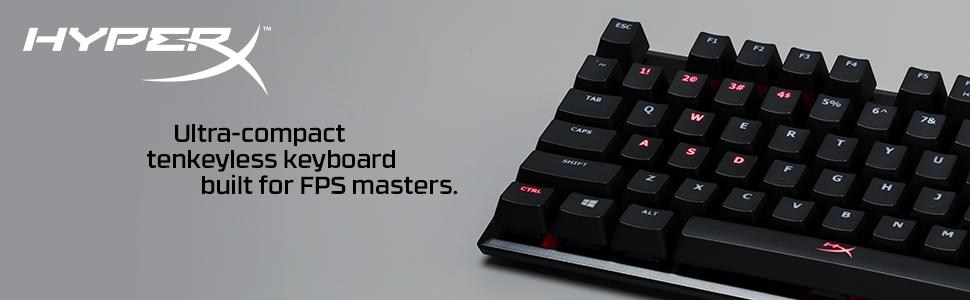
The HyperX Alloy FPS Pro is a premium tenkeyless mechanical keyboard featuring Cherry MX Red switches for ultra-responsive, durable performance. Its compact 87-key layout maximizes desk space, while the detachable braided USB cable enhances portability. Equipped with dynamic red LED backlighting, 100% anti-ghosting, and N-key rollover, it delivers flawless input accuracy essential for competitive FPS gaming. Built on a solid steel frame, this keyboard combines minimalist aesthetics with pro-grade reliability, making it a must-have for serious gamers and professionals alike.




| ASIN | B074F5L8GQ |
| Batteries | 1 Lithium Polymer batteries required. |
| Best Sellers Rank | #103,294 in Video Games ( See Top 100 in Video Games ) #4,277 in PC Gaming Keyboards |
| Brand | HyperX |
| Color | Red |
| Customer Reviews | 4.6 4.6 out of 5 stars (7,778) |
| Date First Available | August 7, 2017 |
| Hardware Platform | PC |
| Is Discontinued By Manufacturer | No |
| Item Dimensions LxWxH | 14.1 x 5.1 x 1.4 inches |
| Item Weight | 1.8 pounds |
| Item model number | HX-KB4RD1-US/R1 |
| Manufacturer | HP Inc. |
| Number of Processors | 1 |
| Number of USB 2.0 Ports | 1 |
| Operating System | Windows 10 |
| Power Source | Corded Electric |
| Product Dimensions | 14.1 x 5.1 x 1.4 inches |
| Series | Alloy FPS Pro |
J**S
AMAZING! you will not regret this purchase!! even if its used...- hyper x alloy pro ten key less
i love this keyboard....buy the white hyper x puddin keycaps with it though because the oem key caps are junk and you see alot of grease on them fast.. i bought it used and let me tell you....this is my first time using a real keyboard with real cherry mx red switches and i literally an going out of my way rite now to go back and write reviews on all of the items ive upgraded my old items with because of how amazing the feeling is you get in your fingers while typing on this keyboard....the top is some type of alloy or aluminum and it is heavy...in such a perfect way...this thing will not move around on you one bit even if your trying to move it without picking it up..the red lights are SUPER BRIGHT and look amazing and work amazing....but you can also dim them lower or to none at all if you choose. if i got this board for 52 bucks theirs no reason any other boards should be 100 dollars or more because theirs simply nothing more you could ask for in a keyboard. you will not regret this purchase one bit. .( if you haven't already, get some 3 in 1 silicone and press the switch down with like i use a dental tool, and take a tiny paint brush and brush the side son the inside and like u can put a good amount in...try too push in down between the stem ans the side wall all the way around...than on your stabilizers you can put some white lithium grease...i did this and holly crap bro its a new board....i have red switches and also i have 2 clear o rings on each key it feels soo much better after the lube, grease and o rings with new caps.. these hyper x keyboards done come factory lubed or greased so thats alot of the wiggling and clanking sounds from like the space bars and stuff..and theirs some noises in the actual switches as well, but lubing them with that silicone 3 in 1 oil will make them smoother than butter holly crap... i got a huge thing of white lithium for 4 bucks and a good size 3 in 1 silicone for 3 bucks both at home depot. this also will completely change the feeling of the board too something of a totally higher caliber of board...it will feel and sound like those high end 3-400 dollar boards if you do this i promise...feel free too upgrade the grease and oil too better name brand of your choice if you prefer but its not necessary..) bying the vulture rubber keycaps is an amazing edition too the board as well especially if you have the hyper x puddin keycaps they feel super solid and are nice when gaming..there the same exact set youll receive if you were to order the tai hao rubber keyset for much cheater but youll wanna use the 4 arrow keys too replace the z,x,c,v keys since this set actually dose not include that
D**T
Great for high-performance gaming, but at the same time, just a good keyboard overall.
This keyboard is stellar. I prefer it by far to my previous main, a Corsair Cherry MX Red board (and all my other keyboards), and it's far more enjoyable to both game AND type on. The board is very minimal and aesthetically pleasing, which was something I was very hyped for due to the aforementioned keyboard being far too gamery and gimmicky appearance-wise. But the switches were definitely the standout feature for me, and I say that as someone who was very skeptical of them after recently trying Kailh's Box switch range and ending up quite disappointed (at least for use with gaming). I also love these switches the most compared to all my other switch types, be they Romer-G, Razer Purples, Cherry MX Browns/Blacks/Reds/Blues, or whatever else. They just feel amazing, and I've felt like my gaming has benefited quite a bit. Even my noob Osu! play has shown some improvement. There definitely seems to be a reduction in reaction time with jiggle strafing, or adjusting to enemy player movements, with a definite drop in delay with key spam too. I've been testing switches for the last few months in games to see what works best, so I feel confident in making that claim. I can't say whether they're better than MX Silvers though, as I've not tried those yet. RGB: The RGB LEDs are definitely better than other boards I've got, though I will say that it wasn't a big selling point for me. I don't care much for RGB, but if the board has it, I'll turn it on and leave it on a solid colour, unless there's a nifty effect like the fire ripple of Razer's, or the GMMK's various wave effects. The software was extremely basic though, and it took me a good bit of fiddling to figure out how to set my profile as a default on the board. There are also far fewer effects and means of customising lighting schemes when compared with the competition's software offerings. So consider this as a big negative if you're looking for sophisticated RGB lighting and profile management. It didn't bug out though, which I can't say the same for Logitech and Corsair's programs, as in my experience they've both bugged out some lights on their respective keyboards, or failed to save to device memory. Verdict: I highly recommend this keyboard, and I'm typing this just two days after receiving it. It's wow'ed me immensely. I would say that, unless you're a stickler for stiffer switches, or absolutely need to use tactile/clicky switches, or just lack the patience to adjust over a day or three to the more sensitive switches, you will almost certainly not be disappointed. I'm going to list some negatives below, but note that I can't sing this keyboard's praises enough. Small negatives: The switches are rather wobbly. You can put your finger on the key and easily move it around in a wide arc whilst bottomed out. If you were hoping for more stable keys like a lot of the newer Razer or box stemmed variants, you're going to be disappointed. HOWEVER, I would argue that it's less noticeable than with Cherry MX switches during use, because you don't bottom out the Kailh Speed Silvers as much, due to higher actuation points and stiffer springs. It's like typing on air :P Additionally, the keyboard seems to buckle towards the center a bit when any force is applied, at least compared to some of the sturdier boards I have. But it was only noticeable when I replaced my keycaps with the HyperX Milk Pudding ones. Other than that it didn't really affect me. Lastly, the keycaps felt a bit harsh on my fingers, almost abrasive. I've seen mention online that they need some breaking in, but it was very noticeable after a couple hours, at which point I moved to the above-mentioned, smoother Milk Puddings that I bought along with the board. Kailh switches like those on this board do use standard Cherry stems, so changing keycaps is a simple affair with the myriad keycap sets available online. If you're unhappy with these that is. Anyhow, I hope this helps someone! I'll update if anything changes. But right now I'm 100% happy and will be using it as my main keyboard for the foreseeable future.
J**N
Need to get used to this keyboard if you're switching from reds but overall its a good keyboard
N**R
First I have to say, this keyboard is GREAT! It arrived way sooner than it was supposed to have arrived and is perfect in every way. [Note: This is my first mechanical keyboard] First impressions: The keyboard has a nice weight to it, not too heavy but not too light that you can easily push it around on accident. The rubber pads under the keyboard were nice, good quality and the keyboard does not move when gaming unless you forcefully try to move it. The switches are great! Nice and light, doesn't take much to acuate them, and are perfect for gaming. The lighting modes are awesome and add a nice flair to the keyboard. Overall a very good buy!
S**P
I originally got the eagle k-77 and liked it. It's more clicky and noisy than the real cherry mx blue in this hyperx. Overall the real cherry mx blue are most stable, constant from one key to another one and slightly less noisy and clicky that the Gaote Switch / Outemu Switch on the eagle keyboard. The overall feeling is of higher quality and for only 40$ more I think it's worth the upgrade. This keyboard is heavy and robust so it doesn't move over the table like cheaper lighter keyboard. I strongly recommend this for people that don't care too much about the sound but like the feeling of good switch. It can be used for gaming but it's more of a productivity typing keyboard. I'm so used to mechanical keyboard that even for gaming I'd rather go cherry mx blue but it's me. It make typing so much more fun when you have a good keyboard like this one. I can't stand my macbook butterfly 2 keyboard anymore and use external mechanical when at my desk. If the noise is not a problem get a cherry mx blue keyboard and enjoy it.
Z**W
Kingston's HyperX Alloy FPS Pro is by far the best keyboard I've ever used to date, and I'll tell you why, first going by quality, performance, and then value. Material quality: For it's price tag, the material quality is exceptional, surpassing that of Corsair's best keyboards which are at least 200$ CAD. The base of the keyboard is very compact and sturdy due to the frame being made of steel rather than just plastics, so it has both quite a bit of weight and great durability. The connection cable is also 100% detachable, so if the cable breaks, there is no reason to replace the entire keyboard, just the cable. Visually, the keyboard features a quite simple yet impressive design with sharp edges, black painted switch bases, and perfectly placed bright red LEDs which provide a glow underneath the keys and around the base of the keyboard. Gaming performance: This model specifically uses the Cherry MX Red switch, a standard mechanical switch for gaming that many of us prefer for the low actuation force, linear press, and subtle clack sound. The feet that prop up the keyboard are rubberized so that the keyboard will not slide very easily when in use, limiting any potential accidents relating to bumping your desk or keyboard while playing. It provides many basic features that almost all mechanical keyboards have, such as N-key rollover, Anti-ghosting, and Game Mode (disables Windows key when active), which is nothing to brag about, but still good to have when paying around 100$. It's compact tenkeyless design may turn off some, but for those who want more desk space for their mouse and other peripherals or hardware may want a smaller keyboard, and this is one of the best ones I've used in the TKL format. Value: For it's MSRP of 100$ CAD, it may be quite barebones in what it offers compared to other mechanical keyboards, but the overall quality, its design, and essential features make it a more cost-efficient choice over many higher priced keyboards from brands like Corsair and Logitech. Specifically, I used to use Corsair's STRAFE RGB with MX Silent switches which only has a few more features which aren't worth an additional 120$ CAD, something which I admit was a huge mistake. Overall, if you've thought about purchasing one of these, I would highly recommend you do so because I promise that you won't be disappointed. It's almost perfect for it's relatively mid-range price range in the mechanical keyboards market.
J**L
Es un teclado de calidad, sólido, pesado por su cuerpo de aluminió, lo cual es una ventaja. Y sobre todo barato para tener switches Cherry MX. Aunque nuevas versiones ya vienen con switches HyperX. La desventaja, es que los switches no son intercambiables. Se pueden intercambiar si consigues un switch de otro teclado donador, si lo quieres con el led, si no, creo si sería posible ponerle switches sin led. En mi caso yo escogí los switcher Cherry rojos, lineales. La respuesta es inmediata, y se sienten excelente. ¿Son ruidosos? Si, pero es algo que tienes que tomar en cuenta cuando compras un teclado mecánido, por lo mismo escogí los switches rojos, porque los azules que son la otra versión disponible, tienen un click extra justo antes de su activación, más el típico "clack" que hacen las teclas cuando golpean el fondo. Se puede usar unos silenciadores que se instalan bajo la tecla, pero no se reduce tanto el ruido, sólo lo hace menos agudo. Además estos silenciadores suelen ser algo caros, y sólo son ligas pequeñas. Las funciones LED son muy buenas. Cuando juego activo sólo las teclas que voy a utilizar, como WASDRFMI, y cuando estoy navegando o escribiendo uso la fija o el efecto respiración. La conexion del cable es sólida, el cable es de excelente calidad. Lo único que no me gustó, fue la calidad de las gomas antiderrapantes. Yo uso mi teclado elevado de la parte trasera, y una de las gomas de uno de los elevadores se desprendió y por poco lo perdí. Muy mal pegamento. Pero fuera de eso, la calidad general es infalible. Es mi primera vez usando un tecladop tenkeyless (sin pad numerico a la derecha), y derrepente si me muevo como para meter números, pero la verdad es por pura costumbre. Creo que para alguien que no es un contador, o físico, matemático, o alguién que uso mucho los números, esto es extremadamente práctico. Es más fácil de transportar, te da más espacio en tu escritorio, y además tienes más espacio para acomodarlo según tu forma de juego. En mi caso yo lo giro 45° a la derecha mientras juego.
Trustpilot
3 weeks ago
2 days ago