
DOWNLOAD THE APP


Customer Services
Copyright © 2025 Desertcart Holdings Limited
DOWNLOAD THE APP


📸 Preserve your legacy in ultra-high-def—because your memories deserve the best.
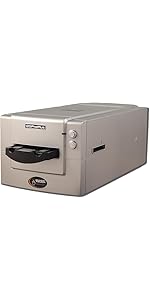
The Pacific Image PowerSlide X Plus is a professional-grade 35mm slide scanner designed for serious digitization projects. It features automatic batch scanning of up to 50 slides, an ultra-high 10,000 dpi true color CCD sensor, and supports both Mac and PC platforms. With a 4.2 dynamic range and DNG raw format output, it delivers exceptional image quality and flexibility for post-processing. Ideal for professionals and enthusiasts looking to convert large slide collections into vibrant digital archives quickly and efficiently.




| ASIN | B0BX5H4DC5 |
| Best Sellers Rank | #208,997 in Office Products ( See Top 100 in Office Products ) #92 in Slide & Negative Scanners |
| Brand | PACIFIC IMAGE ELECTRONICS |
| Color Depth | 48 bits |
| Connection Type | USB |
| Connectivity Technology | USB |
| Customer Reviews | 3.8 out of 5 stars 18 Reviews |
| Greyscale Depth | 16777216 NA |
| Item Weight | 4.65 Kilograms |
| Light Source Type | LED |
| Manufacturer | Pacific Image Electronics Inc |
| Media Type | Slide |
| Minimum System Requirements | Windows 7 |
| Model Name | PowerSlide X Plus |
| Optical Sensor Technology | CCD |
| Resolution | 10000 |
| Scanner Type | Slide |
| Standard Sheet Capacity | 50 |
| UPC | 649899001967 |
| Warranty Description | 1 year manufacturer |
P**S
Digitalizing slides
This unit works great to digitalize your slides into JPG images of Kodachrome 25 and 64 slides into resulting 10 to 20 million pixels.
R**D
To digitize your slides, this is the answer
I have had about 2,000 slides stored in Kodak carousels for many years. It's been on my mind to convert them to digital files, so I can save them, and share them with family. Tried an old Nikon slide converter, but couldn't get it to work, so after much dithering, decided to invest in the Pacific machine. Mostly good, with just a little downside. Bad first. The instructions leave MUCH to be desired. You are left with a fairly steep learning curve. The builders need to have someone who doesn't know how to use the unit write the manual! Now the good. After figuring it out, I quickly processed about 2500 slides. You need to insert the slides as the instructions say, and those instructions are a bit opaque. If you buy the machine, spend a little more and get an extra tray (B&H has them). Speeds thing up so, so much. I found I needed to tell the software to scan one number more than the number of slides in the tray. It insists on starting the scan outside the tray, effectively at number zero. Not a problem, once you figure it out. Bottom line? It worked. Would I buy it again? Yes, although I would very much wish it were cheaper. Hard to say it is over-priced, when there is no good competition. At least that I could find. I docked it one star for the poor manual. No excuse for that, considering what you pay for it.
G**A
Security hazard
Why did you pick this product vs others?: It has the capacity to scan 50 slides at a time. However, there are several problems. The software is terrible. It would not install on a mac at all, because the OS considered it a security hazard. The manufacturer's own instructions tell you to disregard and override security warnings! I eventually installed it on a old Windows machine which I could isolate from the network in case of viruses. I would not recommend this to anyone who doesn't have a throwaway machine. Also, the machine shipped without a power supply (though the instructions say it should have one of course). Luckily, I had a compatible spare. Once I got past that, I found it mostly owrked, with about a 10% error rate, which lowered my productivity immensely. But the selection of such machines is limited, so I persevered, and I did not want to go looking for another, though I was really tempted to just send it back. Given what the machine costs, I think it is scandalous to ship it so sloppily, and with such awful software. Look for something else.
S**.
A *must* upgrade for anyone who have used the previous PowerSilde machines
I don't leave many reviews - perhaps because what I normally buy isn't that interesting, but I am going through and scanning a large collection (almost 500k) of slides and not having a PowerSlide would make it.. nearly impossible to get it all done in my lifetime. I have been using the previous models for four years now, and this one by far is the "best" upgrade one could wish for. It's very quiet (the other ones were not) and it's extremely fast per slide. Quality per slide on this version is slightly better to my eye; however, remember we are all scanning in 35mm slides that have been degraded over time, so there's a maximum you can really "push" your scans. Don't expect a 10,000dpi scan to turn out any better than a 2,500dpi one: exposed 35mm slides are ~ 1000-2000dpi depending on the film used. The benefit of a 10k-dpi scan is specifically for very fine masking or corrective purposes [or] to resurrect details post-processing that have been lost to time. Anyway, I could go on and on, but A+ to Scanace/Pacific as this machine is a GREAT upgrade to those who have used previous slide scanners.
P**K
No problems!
Despite other reviews claiming jamming issues, we have now scanned hundreds of slides, mostly standard cardboard mount, others plastic, without a single jam so far. Quality is excellent. Easy to install software and to use. Would be 5-star if all the on-line elements were made more clear. Update: Giving 5-stars after several weeks of no problems.
P**L
This accomplishes our goal
I started project of scanning and digitizing thousands of slides from the 1940's on, two combined families, So far we have about 5000 done. Received the scanner and immediately had problems with jams. PI promptly replaced it with a new one and all is good. I can load it with 50 slides and run it overnight at high resolution .TIF format with good results.
R**B
Did the job
Instructions could have clearer, and more complete. It only worked using certain USB ports (I believe alt display use type).
B**T
Misfeeding misfortune
Repeatedly misfeeds slides. Cannot process more than 5-7 slides without misfeed or jam. Pusher slips past edge of slide at beginning of scanning cycle. No adjustments or work-arounds provided in the instructions. Calls to Pacific Image and its technical support numbers have not been returned. Seeking immediate full refund.
Trustpilot
2 months ago
1 month ago