

🔥 Elevate your game with OLED brilliance and pro-level speed ⚡
The ASUS ROG Swift PG27AQDM is a 27-inch QHD OLED gaming monitor delivering a stunning 2560x1440 resolution with true 10-bit color depth and 99% DCI-P3 coverage. It features an ultra-fast 240Hz refresh rate and an industry-leading 0.03ms response time, combined with G-SYNC compatibility for smooth, tear-free gaming. Its custom cooling system and voltage optimization protect the OLED panel from burn-in, while the anti-glare micro-texture coating ensures vivid colors and minimal reflections. Perfect for gamers and professionals seeking top-tier visual performance and reliability.


| ASIN | B0BZRBYLP1 |
| Adaptive Sync | G-Sync |
| Additional Features | Anti-Glare Micro-Texture Coating, Blue Light Filter, Flicker-Free, G-Sync Compatible, Tilt, Swivel, Pitvot and Hight adjustable, Ultra fast 0.03 ms Response time |
| Aspect Ratio | 16:9 |
| Best Sellers Rank | #1,445 in Electronics ( See Top 100 in Electronics ) #60 in Computer Monitors |
| Brand | ASUS |
| Brightness | 1000 nits |
| Built-In Media | HDMI cable, Power cord & adapter, PG27AQDM Gaming Monitor, Quick start guide, Warranty Card, ROG pouch, ROG sticker, USB 3.0 cable, DisplayPort cable, VESA mount kit, Color pre-calibration report |
| Color | BLACK |
| Color Gamut | 135 |
| Compatible Devices | Desktop, Gaming Console |
| Connectivity Technology | wired |
| Contrast Ratio | High |
| Customer Reviews | 4.3 out of 5 stars 5,663 Reviews |
| Display Resolution Maximum | 2560 x 1440 Pixels |
| Display Technology | OLED |
| Display Type | OLED |
| Hardware Connectivity | DisplayPort |
| Has Color Screen | Yes |
| Image Contrast Ratio | High |
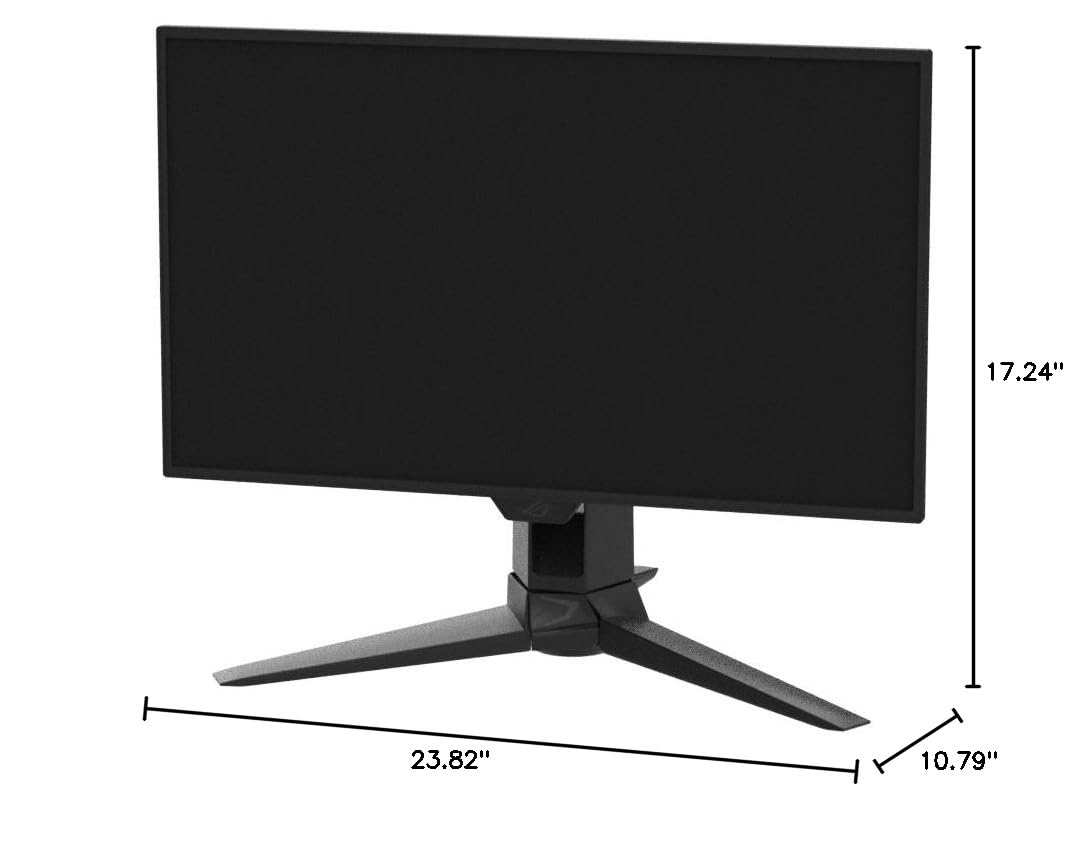
| Item Dimensions D x W x H | 23.82"D x 10.79"W x 17.24"H |
| Item Height | 17.24 inches |
| Item Type Name | Gaming Monitor |
| Item Weight | 15.21 Pounds |
| Manufacturer | ASUS |
| Model Name | PG27AQDM |
| Model Number | PG27AQDM |
| Mounting Type | Wall Mount |
| Native Resolution | 2560x1440 |
| Picture Quality Enhancement Technology | TÜV Flicker-free TÜV Low Blue Light (Hardware Solution) G-SYNC Compatible |
| Pixel Pitch | 0.233 |
| Refresh Rate | 240 Hz |
| Resolution | QHD Wide 1440p |
| Response Time | 0.03 Milliseconds |
| Screen Finish | Matte |
| Screen Size | 27 Inches |
| Screen Surface Description | Matte |
| Shape | Flat |
| Specific Uses For Product | Desktop, Gaming |
| Total Number of HDMI Ports | 2 |
| Total USB 2.0 Ports | 2 |
| Total USB 3.0 Ports | 2 |
| Total Usb Ports | 2 |
| UPC | 195553996471 |
| Viewing Angle | 178 Degrees |
| Warranty Description | 2 year |
| Warranty Type | 2 Year Warranty with ARR |
J**B
Crazy Blacks, Amazing Value, 100% worth the money
the sweet spot for gaming really is 1440p and 120hz++. This monitor is amazing. I cant really see the differrence in 4K vs 1440 but I can absolutly see just how amazing the image looks on this glossy OLED. I watched Tron - Ares on this monitor and all I can say is wow. The onscreen menu is simple and easy to use. The G-Sync with VRR worked out the box with my 5090. I had two minor problems with the monitor so far. I didnt use the included stand, I have my own vesa mount. And the included vesa mount attachment for the monitor was VERY difficult to get attached. I was hesitant to really press down hard to get this thing to click in becuase I didnt want to damage the monitor. I did get it in but it took way more force than I was comfortable giving. The second is that you will want to do a pixel cleaning out the box. It takes about 6 mins, but my monitor had a weird line accross the middle of the display. It was very noticable. I was worried my display was damaged in shipping but did the pixel cleaning and it went right away. Happy as I can be. The monitor is very bright in SDR. If you flip it to HDR the brightness falls a little bit but not bad. I have opeted to leave mine in SDR for the moment. My final thoughts are that this is a great monitor. With OLED finally coming down to the range of "normal" monitors its a real no brainer. If youre a gamer 4K makes little sense. Youre pushing your GPU so hard to fill those pixels and that costs you FPS. Just get the 1440p OLED and push have as many pixels to have those FPS soar and look at those games through a world class display. You wont be disappointed. In my picture you can see the OLED vs my old LCD. Both of those monitors are on and showing a black screen. \ 0.o /
S**G
MIND BLOWING: Did NOT regret this purchase! So WORTH IT!! Color FANTASTIC!!! Speed: EPIC
The hardest part about my computer set-up has been deciding on a monitor... I checked, reviewed, researched, went to stores to look, and took an awful amount of time to find a decent monitor. Finally, I decided to purchase this monitor for the 144Hz speed, dedication to gamers, and the 3 years warranty. Before I go further, I made the right choice! Once you open up the box you immediately see that you have purchased a MONITOR that will do your bidding for serious PC folk or gamers. This is not some cheap junk. It looks great! If looks could kill, they nailed it with the sleek, slim, and modern look. You can tell this is not a bargain store monitor purchase. The stand: awesome. Better than any other junk stands I have had the patience to work with. It adjusts to your liking, firm, simple, ergo, fantastic. Why don't they build all monitors stands like this? Forsake wall mounts. The monitor: FANTASTIC. Once you turn her on (the power button ROCKS) the bright blaze of sunlight will hit your eyes and enter your brain like a slap. Brightness at 100 will let you know that this monitor is capable of burning retinas at a billion candles per inch as well as massages your eyes depending on your mood or quite possibly the fact that you could use this monitor outside (not recommended) and the sun will not dare to outshine it. After the first brightness adjustment, the color on this monitor seemed fine to me, in fact, better than the POS it replaced by light years. Looked around at color recommendations and the simple ones you will find online are fine for any start-up fine tuning. Trust me, color is not an issue. I do not understand why anyone is having problems with color on this monitor... it quite simply ROCKS. 144Hz speed: At startup I went straight to adjusting the refresh frequency from the starting 60Hz to 144Hz. Why? Because this is the highlight feature of this monitor! FAST refresh is better for everything. Why hobble along a 60 mph on the freeway when you know your sports car can get 144 mph without sweating? You simply must max out the frequency for games to enable better goodness on the battlefield, not to mention anything else you do on your PC. Once you put it on 144Hz, you are now a professional PC POWER-user and dare I say it: GAMER. Yes, there is an advantage, YES!! Incredible performance. Price: Got this for the ridiculous price of $209 on a black Friday weekend sale...and then it went up to like $300 after the sale. I would still pay for the $300 on this but keep an eye out for sales that come frequently enough... so worth it. Size: 24 inches is better than 22, and someday the standard will be 27 or 28.. can't wait for the larger variants to become affordable. 24 is great however, very NICE. This monitor was thinking of you, the PC user, with muscle and power under the hood of your build. Regarding HDMI or Display Port users: Why bother? The DVI dual link cable it comes with is the baby you need to plug into your video card for 144Hz goodness. If you add another monitor, fine, deal with it. Regarding speakers: HAHAHAHAHHA, whatever. One wonders why they bothered. Monitors should not come with internal speakers because they always blow due to size constraints and placement. Ever notice how large screen TV's all have sound bars? It's because internal speakers are lame. 3 year warranty: Worth it! Nice!! Ever have a monitor die after a year or so for no reason other than "it was its time"? I have. Hold on to your original box, register with ASUS, and know that you can get some satisfaction when your monitor goes kaput in the next 3 years. Shipping is paid by ASUS. NICE. UPDATE 2.5 years later: Still rocking it, gaming it, videos galore. No issues or problems. Still have my original box if it twitches before 3 year warranty expires. It's my precious. Considering buying another one just like this for my work desk, so worth it! Great performance, ergo as heck, and value with this monitor!! Boom!!!!
R**L
Just get it!
Been using this for two days now and everything is great. I have a dual Xeon workstation and gaming PC connected via KVM. After I got everything hooked up I maxed out the refresh rate at 240 Hz. Right off the bat I got really bad flickering, like multiple flickers per second and only happened at 240Hz. Fortunately, the problem was with my DP cable. Even though it was a Dp 1.4 it just couldn't support that high of a signal. Bought a new one. switched it out, and everything is great. Now, if you were like me I hesitated because my monitor is shared for work and play. I didn't know how bad the text would be considering how that is not a strong suit. The text isn't as sharp as my previous monitor but not a big deal at all. As a matter of fact, I am already used to it and don't think about it anymore. The blacks on this thing is absolutely amazing. The colors are so vibrant and rich and gaming looks so much better, even compared to a non OLED 4k monitor. The one thing that I was not too thrilled about is the auto dimming feature. If I switched from my desktop to MS word, you would see some minor dimming. I found out this is part of the built-in screen saving options. Not sure which ones so I turned them all off. I am not overly worried about burn-in. If it happens then I will use my 3-year warranty. By the way, make sure you register the monitor on Asus's site. Now, add this to your cart and check out. UPDATE: I just upgraded to the PG27UCDM (review above was for the XG27AQDMG). For some reason Amazon won't let me write an independent review, even though it is a different model so I am including it in this review. Without exaggeration, this may be the best monitor ever. It just took a few minutes to change the settings based on what I like. The colors are so vibrant and blacks are so deep. I seriously cannot think of anything on which to improve the quality on this monitor, except for one. There is noticeable flicking if I have VRR enabled. Certainly not a deal breaker but you can see it flicker if you pay close enough attention. Other than that, it's perfect and worth the $$$$.
M**N
A beautiful monitor that stopped working after the first day
[Reviewing ASUS PG27UCDM QD-OLED 4K UHD Gaming Monitor purchased in late October, 2025.] When I first set this up, I had some configuration issues that I knew I needed to find solutions for, but I was impressed that it was bright, well-saturated colors, very clear from UHD, and I loved it. The next day, the screen started going totally black, sometimes as soon as I activated it (it is connected to a new laptop with a RTX 5090), sometimes after 1- 5 minutes. When it goes black, I have to powering it off and reboot the computer, after which it does it again, other times works for a while. I did restore it once by unplugging and replugging the USB-C. One time it started repeatedly switching between my laptop screen and the external monitor. If I have only full UHD active on the Windows display control panel; the control for changing resolution is greyed out. I can change resolution on my laptop, for example to 1920x1080 for playing games, but when this monitor is the active monitor, I have only 3940x2160 (the resolution control on the control panel is greyed out), which makes frame rates unusable. If I set the laptop to 1920x1080 and then activate the second screen duplicating the first, it shows up for a short time in that lower resolution but then goes black. DisplayPort connections do not work. I have a CalDigit hub with DP1.4 output, and when plugged into the monitor, it is not recognized in the automatic detection, nor if I tell it to use DP1.4. USB-C has worked. USB-C generally runs DisplayPort inside. But USB-C is where I have problems with the screen going black or constantly switching between laptop and external monitors. I have been using the high-speed USB-C cable they provided, and another that came with my CalDigit TB4 hub, and I see the same problems, so I don’t think the problem is the cable. I have also tried both USB-C jacks on my laptop with the same results. I have not tried HDMI. It might work, but having only HDMI, and not USB-C and DP2.1, means that significant functions I paid for are not working. At this price point, not good enough. I tried installing a driver from ASUS which made no difference. I noticed after buying it that Amazon has added a banner for this product that says it is a frequently returned item. That was not true before, and previous reviews have been mostly very positive, so perhaps some software or hardware issue has arisen in recently produced models. I spent over an hour on the phone with Asus tech support who in the end suggested I return it. This is disappointing, because on the first day it was really a beautiful upgrade from my previous 27” ASUS IPS monitor, which is about six years old. Still, I’m lucky that the problems happened on day 2, because it is well within the return period. The question is whether to get a refund or replacement.
C**S
Best Monitor I Have Ever Owned
This is easily the best monitor I have ever owned. The ASUS ROG Swift 27” 4K QD OLED is perfect for gaming in every way. I was genuinely shocked by the colors, especially the black levels. The contrast and clarity make games look incredible and feel far more immersive than anything I have used before. After gaming on this monitor, it would be very hard to go back to anything else. I will be using this for all of my gaming moving forward. It has completely changed how games look and feel and has even made me want to replay certain games just to experience them again on this display. I highly recommend this monitor to anyone serious about gaming. It truly elevates the entire gaming experience.
P**E
Great monitor, there is a reason why it is still best seller after being out for years!
****** IMPORTANT ****** Before I start - As everyone has said on these reviews before, the colors look very pale and washed out once you get the monitor. I highly recommend that you Google or go on YouTube and search for this specific video "ASUS VG248QE Color Settings / ICC Profile (and discussing lightboost)". The uploader's name is Static Sleet and the video was uploaded in October 2015. There are other websites that teach you how and some Reddit threads that do the same, but this video is extremely straightforward on what you should do as soon as you get your monitor out of the box. Now, I was very hesitant in getting this monitor because I'm a pretty cautious consumer and read all the one star reviews. I was so afraid of being one of the dead / stuck pixel receivers, but whew! Everything is perfect. I just upgraded from a 20 inch, 60hz, and not a 1ms response time monitor and the difference is staggering. I have this new one and my old one set up side by side and it's like night and day. This monitor is much more bright, vibrant, and crisp than the blurry and dull image I see on the old monitor. The box was well packaged and the monitor very secure, and there are no scratches or any parts bent / out of place. Sure, it's not one of the more expensive 1440p models that boast G-Sync and yada yada, but if you're on a budget constraint that allows you only to get monitors around 300-400$, this is a steal. So, if you're like me, stop looking at the $600 - $1000+ monitors and narrow them down to two models - this ASUS VG248QE or its 27" counterpart, or the BenQ Zowie XL2411Z that is probably the other one you've been looking at. The only thing that you should do now is go on Google / YouTube again and search "BenQ XL2411Z vs ASUS VG248QE 144 hz Monitor Comparison - Which is best for YOU?" by Gus Tech. As you can see through the comments and other sites that pit these two versus each other, ASUS blows BenQ out of the park when it comes to picture QUALITY (color, vibrance, etc). The BenQ is claimed to be more efficient however in games because it stays true and strong in those parts of FPS shooters like CS:GO where you're turning around corners and shooting people very quickly. As a FPS fanatic, I can tell you that it is not noticeable at all. It was a no brainer for me to choose the ASUS model after looking at the video I just mentioned because a little "efficiency" is not worth sacrificing an amazing picture for. Unless you're some world champ shooter that somehow notices this little difference when you're turning around corners, you're not going to notice any difference in those terms at all. The BenQ colors are just terrible. I wouldn't want to play video games to be better if I'm not going to like what I'm looking at, and you probably don't want that either. Also, one thing I was debating on before getting this model was whether or not I should get the 27". My 20" is so tiny and I was so sick of it, so I thought - the bigger the better. However, I looked up "Is a 27 monitor and 1080p" worth it and the results weren't that great. Many said that you would notice a loss of quality almost immediately unless your computer is extremely far away from you and to the back of the desk, but that wasn't me because my monitor is sitting only an arm's length away. I also read on Reddit from people with 27" models that it was simply too big for them and they actually got worse at high speed video games because their eyes couldn't keep up with everything that was going on in the corners and sides of the screen. So, following that advice, I got the 24" because the quality would seemingly be at 'perfect' balance and not stretched out onto a 27" screen and because I didn't want the problem of not being able to see everything happening if I'm playing a fast-paced video game. I'm very glad that I listened to them! I'm actually having trouble sometimes keeping up with this screen too because it's also very big when an arm's length away. If I had a 27", it would be great for watching some movies far away but.. not at all for games unless you have additional eyes beside your ears. An added bonus with this is that you'll be saving 50$ too (by not getting the bigger model)! Overall, I think you should get this VG248QE if your budget falls around here and you're looking for an entry-level 144hz, 1ms, 1080p monitor. Yes, there are lots of one star reviews because of misplaced pixels, but I can tell you after hours of searching for monitors before I got this one that there is only ONE monitor I found with only 4-5 star reviews - and it cost 2300$ and only like two or three people actually reviewed it.. Every monitor you come by will have problems from consumers such as dead pixels, power failures, the monitor simply dying, buttons falling off, etc. The VG248QE will have a lot more of these simply because of the sheer amount of people that have bought this over the years. When you're producing a lot of these monitors, obviously some are bound to fail. but this model, as you can tell, is always holding strong near 80% five star reviews - which is a lot higher than other monitors that I have seen on Amazon. Just pray that you're not in the 20% and buy it. Don't press your back button and go to the BenQ. Just get it!! Oh, and a lot of people seem to not be getting DVI-D cables with their orders so I read those reviews and got the gold plated, ferrite, DVI-D cable that is under the "products frequently bought with this" because I thought I wouldn't be getting one. Well, I did get one with the monitor. So, take that with a grain of salt; you may or may not get one.
B**K
My thoughts on this Monitor
First I should say I’m happy to own this monitor. Endgame? Yes, It’s literally one of the best monitors you can get off the market. I love glossy, this is semi glossy. For you people that are unsure if you want to do matte or glossy, this is a great middle ground. I’d actually prefer this to be more glossy like the other one but this gives people options. That screen glare reflection crap doesn’t bother me one bit. My window isn’t near my monitor, my lighting is on point, also even if it wasn’t this being semi gloss would help that out a lot. Now I was in a cross battle between getting the best Samsung monitor that competes with this or this and ended up getting this. DP 2.1 was needed and I wanted that glossy. Glossy is a must for your boy. One thing I don’t like about this monitor in my opinion is that it’s not bright enough for me. You pay over a band for this thing and the brightness could be better, a least give the option. I think most wouldn’t complain about the brightness. Just me nitpicking but it’s a worthy nitpick. The control knob thing works easy, it definitely does what it says it does. I’m going to desk mount it. Remember to use distilled water to clean this. Don’t jack up your monitor! Not that I did, I just watch a lot of YouTube videos lol.
R**Z
Amazing Colors
Really Great monitor, vibrant colors, and great refresh rate. One of the best monitors hands down. Works like intended. Easy to setup but if you want HDR you have to go through your windows settings and enable it. Base takes up a bit of space but not too bad.
Trustpilot
5 days ago
2 weeks ago



