We remain fully operational. Our teams are working around the clock to ensure your deliveries continue safely.

DOWNLOAD THE APP


Customer Services
Copyright © 2025 Desertcart Holdings Limited
DOWNLOAD THE APP


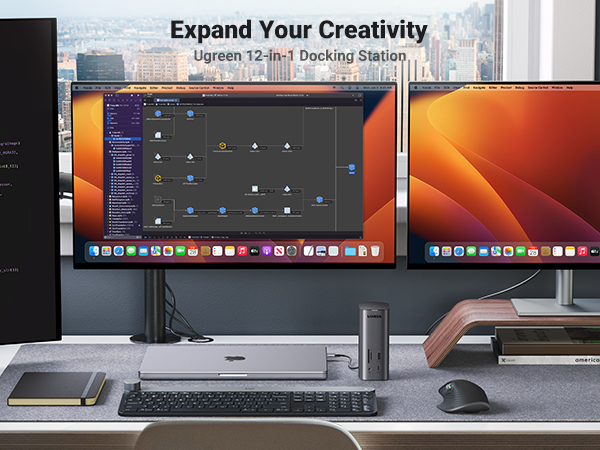
🚀 Elevate Your Setup with UGREEN Revodok Pro!
The UGREEN Revodok Pro 312 is a cutting-edge USB C docking station that offers 12 versatile ports, including 8K HDMI and 10Gbps USB connections, along with a powerful 100W GaN charger. Designed for both Mac and Windows users, it supports triple display modes to enhance productivity and streamline your workspace.




| ASIN | B0C3LT2BW9 |
| Best Sellers Rank | #257,240 in Electronics ( See Top 100 in Electronics ) #2,130 in Laptop Docking Stations |
| Brand | UGREEN |
| Compatible Devices | MacBook |
| Customer Reviews | 3.0 out of 5 stars 70 Reviews |
| Hardware Interface | USB Type C |
| Manufacturer | Ugreen Group Limited |
| Number of Ports | 12 |
| Total HDMI Ports | 4 |
| Total Number of HDMI Ports | 4 |
| Total USB Ports | 5 |
| Total Usb Ports | 5 |
| Wattage | 100 watts |
V**2
Effortless Setup and Exceptional Charging Speed!
I recently purchased the UGREEN Revodok Pro USB C Docking Station with its impressive 100W GaN Charger, and I have been thoroughly impressed by its performance. The setup was a breeze, straightforward enough that I had it up and running in no time, seamlessly integrating into my workspace. Compatibility has been a key factor for me, and the Revodok Pro does not disappoint. It works flawlessly with my Mac M-Series, which is a relief as not all hubs are as accommodating. Its versatility extends to Windows machines as well, proving its prowess as a multi-platform solution. But where the Revodok Pro truly shines is in its charging capability. The 100W GaN charger is a game-changer, delivering fast charging that has saved me countless hours. I can power up my devices in a fraction of the time it used to take, which is crucial for my productivity. In summary, the UGREEN Revodok Pro is a remarkable piece of technology that delivers on all fronts. If you're in the market for a reliable and powerful docking station that's easy to set up and works across different operating systems, this is the one to go for. Highly recommended! Lastly, just throw away the CD that it comes with and download the latest DisplayLink drivers from Synaptics website. There is nothing special about the version that is on the disc, just a older version of DisplayLink.
S**H
DO NOT PURCHASE!!!
Cannot connect with one of my laptops for work, and when connected to my personal laptop there is significant input delay even when performing the most rudimentary tasks.
A**H
Recomendado
Equipo profesional de excelente calidad, lo uso para un estudio de grabación musical, recomendado.
C**S
Just get the good one.
I bought my Ugreen UGREEN Revodok Pro 312 USB C Docking Station with 100W GaN Charge in August 2023. After a few months, my monitor started flickering. I tried everything—changing cables, ports, etc. It turned out the issue was my docking station... and it has only gotten worse since then. I no longer use it to connect multiple monitors; it only works as a USB hub now. I recommend: If you need a portable one, go for the USB C Docking Station Dual Monitor, UtechSmart 11 in 1 USB C Hub Triple Display. If you need one for your workstation, the CalDigit TS4 Thunderbolt 4 Dock - 18 Ports is a great choice.
B**V
Stellar product with a lot of hoops to jump through to get it working
This is my first docking station, but I’m not sure why I waited so long to get one of these. This thing really is great. It gives me so much more flexibility with my laptop. For reference, I’m using an Alienware 15 that’s a few years old. I did have to install the drivers to make this work, that’s another story altogether, but once I did that, it worked as soon as I plugged it into the dock. Installing the drivers was more difficult than it needed to be. The dock came with a small disk. Really? What year is this? I don’t think I’ve seen an optical drive on a laptop in about a decade. That’s pretty dumb. The alternative is to manually type a super long URL that takes you to a site called mediafire, where you are inundated with advertisements. I mean there are so many advertisements that you can’t tell which button is actually the button to download the drivers and which button is just clickbait to get you to click on an advertisement. Once you download the driver, you’ll find that it’s a .rar file. I’m using Windows 10 and as far as I know there isn’t a program native to Windows 10 that will unzip a .rar file. This was another “Really?” for me. Instead of installing the spamming, flashing Winzip advertisement on the mediafire site, I opted to install 7zip, which I know will unzip it. I still shouldn’t have had to install anything to unzip a file from a sketchy location after typing in a dna sequence URL address manually. Once the .rar file was unzipped, I navigated to the Windows folder in the unzipped folder and installed the driver for Windows. I also opted to install the display manager from the Windows stores so I could get the full experience and write this review. After all that, things worked almost perfectly when I plugged the laptop into the dock. After you install the drivers and the display manager, you have to configure the displays in Windows when you plug in the laptop. It’s not a huge deal but could be a journey if you’ve never done any of these things before. The dock also changes your default sound inputs and outputs to the dock, so you’ll likely want to change those back to the default sound sources if you don’t want to plug stuff into the dock. On a side note…Since my laptop is an Alienware 15, it uses a single 240W adapter to power the mobile 2070 Super during gaming, but it can be powered for normal tasks through the USB-C port at a maximum of 65W. While this isn’t enough to power the laptop during gaming without draining the battery, the 65W is enough to actually charge the battery during mundane tasks such as working on office docs, email, and even YouTube videos. I noticed that with the laptop plugged into the dock, not only do I now have three monitors (one 27” in portrait and one 27” in landscape) with my Windows desktop extended across all three, but my laptop is also charging. As I write this review. Very cool. Overall, there are a lot of hurdles to getting this installed and working, far more than there should be, that’s for sure. If you aren’t tech savvy and aren’t used to installing programs, unzipping files, navigating through folders, installing software, installing software from the Microsoft Store, configuring your display settings in Windows, and configuring your audio sources in Windows...You. Are. Going. To. Have. A. Bad. Time. I’m giving this otherwise stellar product 3-stars for the hoops I had to jump through to get the drivers installed. A disk or a download from a sketchy website? Really?
A**M
Great portable size. Included GaN charger is fantastic. Good amount of options.
I was not familiar with this brand but some research suggests that Ugreen has put a lot of effort into improving their products. This particular hub is premium and there is no doubt about it. It has a really beautiful metal body that looks sharp and matches Apple equipment particularly well. I will say that the included GaN charging brick is fantastic. It provides a significant amount of power to run the hub and charge my computer at the same time, and both of those cables are included. The charger includes an additional C port for charging an additional device, so it's a really nice addition. The driver was pretty straightforward to install. It did include a Mini CD for installing the drivers, but I did not feel like digging out my external CD/DVD-Rom driver to install it. Instead I used the link to find the driver that, strangely, is hosted on MediaFire. Once installed I was ready to go. So far, everything has been working pretty well with my dual monitor setup. I have occasionally run into an issue where my computer will not detect a monitor plugged in, even though the other devices plugged into the hub have worked fine. So I will have to do some restarting to get everything to work again. I'm not sure that the hub is the culprit, so I haven't removed any stars for this issue until I determine the cause. It also can run very hot. I don't know how hot it should be and it hasn't caused an issue yet, but it is something I noticed. Other than these few observations, I've been very happy with it. It includes just about every port I could ever need and the small size makes it pretty portable.
M**A
Stopped working!
Good hub, but stopped working, almost one year later. :(
E**.
Great dock for Apple M processors
Uses Display Link and allows multiple monitors on Apple laptops with M processors.
Trustpilot
2 months ago
2 months ago