
DOWNLOAD THE APP


Customer Services
Copyright © 2025 Desertcart Holdings Limited
DOWNLOAD THE APP

🖨️ Elevate your home office with speed, style, and wireless ease!
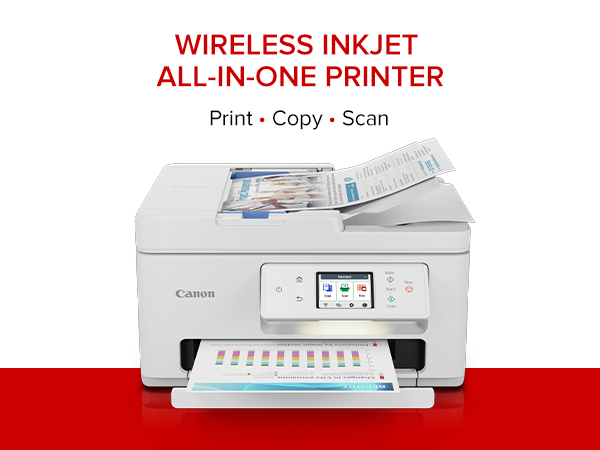
The Canon PIXMA TR7820 is a compact, wireless all-in-one inkjet printer designed for home use, delivering fast print speeds of up to 15 ppm (black) and 10 ppm (color). Featuring a 2.7” touchscreen, automatic duplex printing, and a 35-sheet auto document feeder, it supports versatile media types including borderless photos and banners. With easy setup and two simple ink cartridges, it offers hassle-free maintenance and seamless connectivity via Wi-Fi and USB, making it ideal for professionals seeking efficient, high-quality printing at home.




| ASIN | B0CHLBPMYF |
| Additional Printer Functions | All In One |
| B&W Pages per Minute | 15 |
| Best Sellers Rank | #59,607 in Office Products ( See Top 100 in Office Products ) #61 in Ink Tank Printers |
| Brand | Canon |
| Built-In Media | Documentation, Ink: 1 PG-285 Black and 1 CL-286 Color Cartridges, PIXMA TR7820, Power Cord |
| Color | White |
| Color Pages per Minute | 10 |
| Compatible Cartridge | PG-285 Pigment Black Ink CL-286 Color Ink |
| Compatible Devices | PC, Smartphones |
| Connectivity Technology | USB, Wi-Fi |
| Control Method | App |
| Controller Type | Android |
| Customer Reviews | 3.8 out of 5 stars 482 Reviews |
| Display Type | LCD |
| Dual-sided printing | Yes |
| Duplex | Automatic |
| Hardware Interface | USB |
| Ink Color | Black, Color |
| Item Dimensions D x W x H | 13.8"D x 14.8"W x 8.2"H |
| Item Type Name | Inkjet Printer |
| Item Weight | 16 Pounds |
| Manufacturer | Canon |
| Maximum Copies Per Run | 99 |
| Maximum Copy Resolution Black and White | Up to 1200 x 1200 dpi |
| Maximum Copy Resolution Color | Up to 1200 x 1200 dpi |
| Maximum Copy Speed Black and White | 15 ppm |
| Maximum Media Size | 8.5 x 11 inch |
| Maximum Print Resolution Black and White | Up to 1200 x 1200 dpi |
| Maximum Sheet Capacity | 100 |
| Maximum print Resolution Color | Up to 1200 x 1200 dpi |
| Model Name | PIXMA TR7820 |
| Model Number | 6258C002 |
| Model Series | TR |
| Number of Trays | 2 |
| Other Special Features of the Product | Auto Document Feeder, Auto-Duplex, Borderless Printing, Energy Star, Touch Screen |
| Paper Size | Rear Tray: LTR, Legal, A4, A5, B5, 4” x 6”, 5” x 7”, 7” x 10”, 8” x 10”, Square 3.5” x 3.5”, 5” x 5” Custom Size: 2.2” - 8.5” / Length: 5” - 14” Cassette: LTR, A4, A5, B5 |
| Power Consumption | 22 Watts |
| Print media | Envelopes, Glossy photo paper, High-resolution paper, Paper (plain) |
| Printer Connectivity Type | USB, Wi-Fi |
| Printer Output Type | Color |
| Printer Type | Inkjet |
| Printing Technology | Inkjet |
| Processor Count | 1 |
| Resolution | 1200 x 1200 |
| Scanner Type | Flatbed |
| Special Feature | Auto Document Feeder, Auto-Duplex, Borderless Printing, Energy Star, Touch Screen |
| Total USB 2.0 Ports | 2 |
| Total Usb Ports | 1 |
| UPC | 013803359985 |
| Warranty Description | 1 year |
| Warranty Type | Limited |
| Wattage | 22 watts |
A**S
Great printer/scanner
I have had this printer for a while now. Definitely worth the purchase. Easy to set up and use. The scanner works great and it has the two sided printing too which comes in handy. Has two different trays to feed paper in. I mainly just use the bottom drawer for paper. I also use it wirelessly and it works great too. The ink is really easy to change out when needed too.
M**N
This printer is not dependable.
i HAVE HAD THIS PRINTER A LITTLE OV TWO MONTHS. It is easy to set up but it frequently turns off and needs to be connected to my computer again. Apparently the fact that it turns off frequently is to save energy and supposedly I could set it not to turn off but I can't find that control. I is frustrating to have to keep connecting it to my computer. Also it is some times hard to delete items in the print queue so it will accept a ne print job. sometimes turning off the printer and turning it back on will get the print queue removed but not always. Right now I can't print because I have turned off the printer three times and turned it back on 3 times but it still has a document in the print queue.
A**K
Affordable clear printing printer
Love it! Prints great. The speed is great and there is of use.
M**.
Ink usage not soo good, but a good buy
This is good for moderate home use. The print quality is great, but the black ink cartridge runs out pretty fast. I've noticed at times it takes a long time to print files when sent from certain mobile devices. I recently upgraded my phone to the galaxy fold 7 and it works perfectly with it.
N**R
Very nice printer for the price
I had a HP Officejet printer that I've used since 2011-2012. Nice little all in one printer but I got a printhead not found issue. The issue might have been ink cartridge related and new ink ($110) might have fixed it, but rather than take the risk I figured I would buy a new printer because it wouldn't cost much more than that. Enter the Cannon PIXMA TR7820. $130 delivered and it came with ink. Set up very quickly. Print and copy quality is solid. The auto feeder for scanning is much better than my HP (keeps the pages straight). My only concern buying this was would it integrates with Google Drive, which is where I like to scan my documents to? Sure enough it handles this quite well. You can spend more and get a nicer printer that can scan/copy/print faster and in higher quality, but if you don't need that then why pay for it? As a bonus replacement ink is reasonable. $45 for regular black and color cartridges or $75 for the XL versions.
M**E
Great Printer
I have had this printer since October 2024 and was very happy with it until a month or so ago. It started with many, many paper jams. Then a 6000 error message to take it for repair which seemed a little far fetched. The print cartridges started jamming occasionally and wouldn’t move out of their non print location. I did all kinds of troubleshooting and eventually was able to print again. Unfortunately the cartridges make pounding noises when printing and sometimes continue after printing is done. Now it prints part of the paper ok but the rest is garbled. I’ve aligned the print heads as instructed but nothing seems to help. I have had many Canon printers over the years and loved them. Unfortunately this one was great until a month or so ago and whatever I try nothing seems to work. The online manual doesn’t address these problems. If the problems can’t be corrected and I have to purchase another printer, I’ll probably think twice before getting another Canon.
T**N
Surprisingly great Little Printer
This Printer is a Gem so far - Don't usually write reviews but this printer came quick fast and easy from a long distance down south. It worked perfectly right out the box. any by the way, no cover box was used, only the printer box. The printer is so masculinly cute for men use as well as women and compact but prints fast smooth and easy. It connects to your wifi and devices quick and easy. I sure hope this last at least a year minimum and on the best side three or more years - Thanks Canon! if this printer does not hold up I will do a second review to give a better evaluation for the duration long term use which is the real test of any such product. It prints pages much faster than I thought - The long term use of the ink is now the final measure and that will take another week or two- see you then!
D**1
Love-Hate relationship
1. When it is working, this printer does very well. The Scan feature is much more sophisticated than my old HP 4-in-1 device. In most ways it is user-friendly. And I repeat, when it is working- or more precisely, when it is connected to my PC. 2. The setup did not go smoothly and took much longer and more effort than previous printers I have owned. 3. Repeatedly this printer goes “off line” and says there is no connection to WiFi. I have a good WiFi-Router and our TV has no problems receiving it or staying connected to it four rooms away.. This printer is sitting next to the WiFi router and can’t seem to stay connected. It takes up WAY too much of my time getting it re-connected so that I can print something. 4. If I had to use one word to describe this printer, I would say, “annoying.” 5. I probably WOULD NOT buy this printer again knowing what I know now. I should have paid more attention to those reviewers who warned me that this printer had problems staying connected to WiFi. 6. I almost NEVER write negative reviews and I waited nearly two months before I wrote this. I am pretty tech-savvy and I am about 98% certain problems with this printer are not my fault. Addendum October 20, 2024: I probably would give this printer just one star now. Recently it insisted on updating the software. I should have refused. It took me over an hour to get it reconnected to my desktop and printing normally. The printer has slipped from the irritating to the maddening category. In retrospect (everything is 20/20 in the rearview mirror), I should have tried harder to get a printer with both a Wi-Fi AND a hard-wired connection. Like my old printer. Also I should have paid more attention to the reviewers who mentioned how expensive the ink is for this printer… my bad. 2nd addendum August 20, 2025: I have now downgraded my rating to one star. This printer worked reasonably well for a few days or weeks at a time and it is now back to its old tricks. The worst of which is in inability to stay connected to my desktop PC. I spent 45 minutes trying to get it reconnected last night. I think it is time to throw in the towel and get another printer. This one is not heavy enough to use for a boat anchor and is too bulky to use as a doorstop... It has now entered the category of worthless piece of dung.
Trustpilot
1 month ago
5 days ago