


🚀 Mini PC, Mega Power: Elevate your workspace with 4K multitasking mastery!
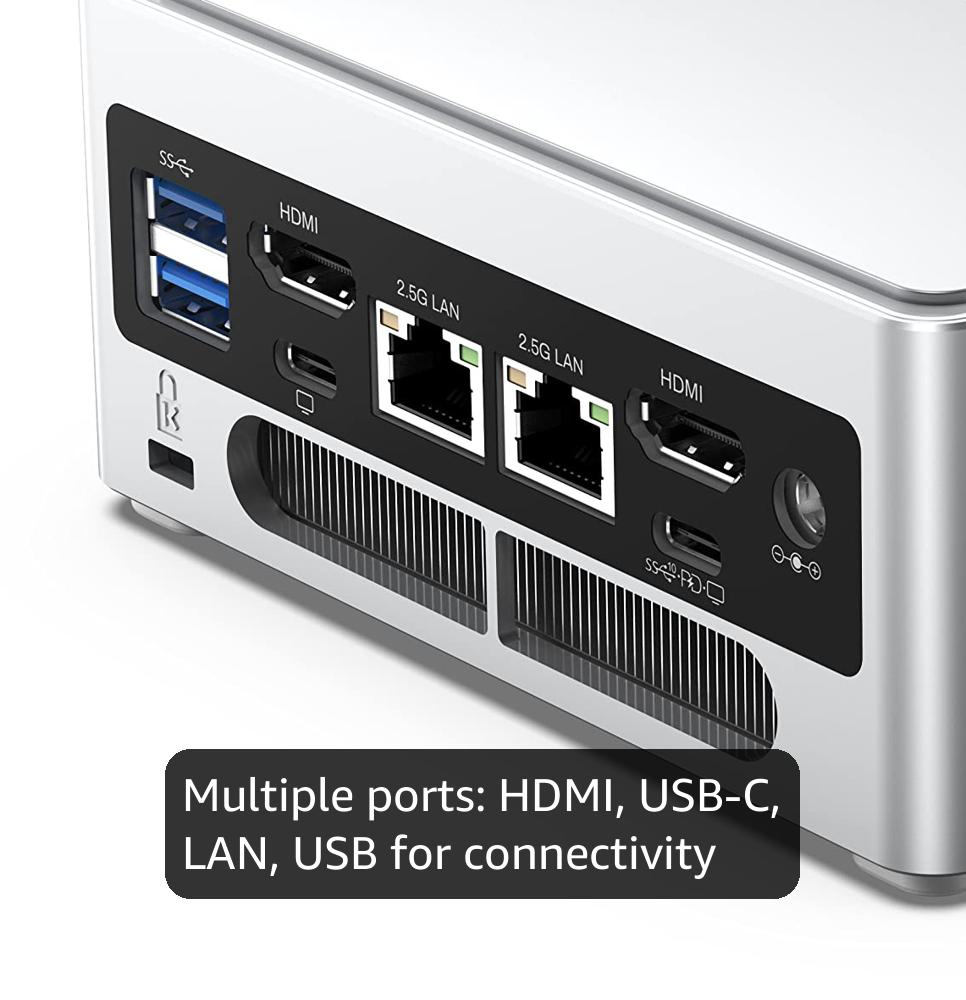
The NAB6 Lite Mini PC packs a powerful Intel Core i5-12600H processor with 12 cores and 16 threads, paired with 16GB DDR4 RAM and a 500GB PCIe 4.0 SSD for ultra-fast performance. It supports up to four simultaneous 4K@60Hz displays via dual HDMI and USB-C ports, perfect for multitasking professionals. Dual 2.5G LAN ports ensure lightning-fast network speeds, while its compact design offers expandability up to 64GB RAM and 2TB storage, making it ideal for demanding office, AV, and digital signage applications.


| ASIN | B0D25JR79C |
| Aspect Ratio | 16:9 |
| Best Sellers Rank | #7,717 in Computers & Accessories ( See Top 100 in Computers & Accessories ) #307 in Mini Computers |
| Brand | MINISFORUM |
| Built-In Media | Mini PC |
| CPU Model Number | Intel Core i5-12600H |
| CPU Model Speed Maximum | 4.5 GHz |
| Color | Silver |
| Connectivity Technology | Bluetooth, Ethernet, HDMI, LAN, USB |
| Cooling Method | Fan |
| Customer Reviews | 4.0 out of 5 stars 85 Reviews |
| Display Resolution Maximum | 3840x2160 Pixels |
| Display Type | LED |
| Graphics Card Interface | Integrated |
| Graphics Coprocessor | Intel Iris Xe Graphics eligible(Frequency 1.4GHz) |
| Graphics Description | Integrated |
| Graphics Ram Type | DDR4 SDRAM |
| Hard Disk Description | SSD |
| Hard Disk Interface | PCIE x 4 |
| Hardware Interface | 3.5mm Audio, Bluetooth, Ethernet, HDMI, Headphone, USB, USB Type C |
| Human-Interface Input | Keyboard, Mouse |
| Keyboard Description | Wired, Full-size, QWERTY |
| Keyboard Layout | QWERTY |
| Manufacturer | Micro Computer (HK) Tech Limited |
| Memory Clock Speed | 3200 MHz |
| Memory Slots Available | 2 |
| Memory Speed | 3200 MHz |
| Memory Storage Capacity | 16 GB |
| Model Name | DeskMini |
| Model Number | DeskMini |
| Native Resolution | 3840 x 2160 |
| Number of Component Outputs | 4 |
| Operating System | OS |
| Personal Computer Design Type | Mini PC |
| Processor Brand | Intel |
| Processor Count | 12 |
| Processor Series | Core i5-12600H |
| Processor Socket | FCBGA1744 |
| Processor Speed | 4.5 GHz |
| RAM Memory Installed | 16 GB |
| RAM Memory Technology | DDR4 |
| RAM Type | DDR4 SDRAM |
| Ram Memory Maximum Size | 64 GB |
| Resolution | 3840 x 2160 |
| Specific Uses For Product | Home Theater, Digital Signage, Video Conference, Business, Education, Everyday Use, Multimedia |
| Style Name | NAB6 Lite(16+512) |
| Total Number of HDMI Ports | 2 |
| Total Usb Ports | 4 |
| Video Output | 2x HDMI, 2x USB-C |
| Video Output Interface | HDMI, USB-C |
| Video Processor | Intel |
| Wireless Compability | 802.11ac |
| Wireless Technology | Bluetooth, Wi-Fi |
O**R
Great Media Server
I had a home media server that needed an upgrade since the GPU couldn't decode AV1 video, and I wanted to start using that format. I was going to buy a new video card that supported AV1, but I heard about how well the newer Intel iGPUs handled decoding AV1 and other formats. I thought it would be great to buy a mini PC for less than a video card and have a mini PC that used much less electricity than the PC it was to replace (or even just the video card). I know I could have bought an even less expensive PC with an Intel N100 for my needs, but since I often repurpose PCs, I wanted something that could be a capable home PC. I was impressed with this PC from the moment I unboxed it. Everything was packaged nicely and the PC felt sturdy. I saw the sticker on top of the PC case showing how to open the lid. That is a nice feature, but I didn't like the sticker and removed it. I thought it would come off easily like the plastic that came on a new cell phone screen, but it didn't and I suspect they didn't intend for it to be removed. They used some serious glue and it left a sticky residue that did not come off with rubbing alcohol. I guess I will need to buy something else more capable of removing the residue. I fired up the PC, configured Windows, made sure Windows was activated, and made a backup with Clonezilla. I was disappointed that this PC came with Home Edition when all of my other mini PCs came with Windows Professional, but I didn't care too much since I was going to wipe it out and install Ubuntu MATE. ***Windows Home Edition will be an issue if you need this for an office environment and need Remote Desktop.*** There were some errors reported when installing Ubuntu MATE, but I don't know what they were and there were no issues afterward. I also have experienced these errors during installation with other PCs and virtual machines, so I think it is common. I did not notice any hardware not functioning properly, though I didn't try using Bluetooth or WiFi. I have a home network with a mix of 1Gb, 2.5Gb, and 10Gb, so I was pleased to see this PC had 2.5Gb connectivity. It actually has two ethernet ports with 2.5Gb and not 1Gb and 2.5Gb like another I owned. I have played with link aggregation in the past, but I didn't want to deal with that. A single 2.5Gb connection will be just fine for my needs. My home internet is also limited to 1Gb, so I could max out my connection to the outside world and still have plenty of network speed for the internal network, though that will never happen. Ubuntu ran like a dream on this PC and I was shocked at how quiet this PC was when the CPU was at 100% for an extended period of time. I kept the CPU at close to 100% and RAM use around 80% for a few hours. This has the quietest CPU fan of any mini PC I have owned (and I have owned a few). Once indexing all the media was over, this PC was near silent. I couldn't hear it with the ambient noise in a rather quiet house. I had first tested configuring a media server on a lower power mini PC since I am not a Linux expert. That test PC did well at streaming, but the library menu was slow. The weak CPU and low amount of RAM were likely the culprits. I would scroll through the library and it would pause and then cover art or movie posters would slowly load. That was not the case with the MINISFORUM NAB6. This thing was just as fast as the full-size PC it had replaced with an Intel i7-8700K, 64GB of RAM, and an NVIDIA P2000 GPU. I had a friend test it remotely and he said it was like using it on the local network. Since I specifically chose this PC for the GPU, I chose the Intel i5-12600H since it has a slightly more powerful iGPU than the i5-12450H. Will it ever make a difference for my use? I have no idea, but I wanted bit more GPU power without bumping up to an Intel i7. This iGPU could handle multiple streams at once and do something my NVIDIA P2000 GPU couldn't, decode videos in the AV1 format. I played two 4K videos at once and had them transcode the video down to 720p. The GPU was handling the video with ease and the CPU had no issue dealing with the audio. I really need to see how many transcodes I can have going at once, but I haven't had the time. I will update this review if I get around to it. If you need a new PC for office or school work, this mini PC should work well while consuming less space and electricity than a full-size PC. I cannot tell you how it would handle editing video or using power hungry software like Photoshop, but I would tend to recommend something much more powerful for that. I can tell you this PC will work great as a media server, but I cannot say how many streams it could push out over the internet. I did not try that because it was not how I would be using it.
R**Y
Great little unit, powerful, decent price
Love it! I'm using it to run an opnsense firewall and it's been running great! My last mini PC from another brand didn't last very long. I've been pleased with minisforum thus far and hope I get longer life from this unit.
A**.
Beware of what kind of company you are dealing with.
I am an IT professional and have had my own business since 1999. I ordered a unit based on a review from a trusted web site. Unit worked for two weeks then wouldn't power up. I had to pay $85 to ship to their tech support center, a residential address in a neighborhood in CA. The company address is in Hong Kong. I received the replacement unit and it worked for a week and then wouldn't detect the M.2 hard drive. At this point I was upset. Tech support told me I had to purchase a replacement hard drive myself. I did, and it made no difference. At this point I was very upset. Tech support no longer responded to my inquiries. Not a US based company so no legal option. If you roll the dice beware that this is not a big US company that will go to great lengths to make sure you are a satisfied customer. You get two shots, and if you get a lemon both times your out of luck. Caveat Emptor is the word of the day when trying to get a bargain by using these little boutique outfits. I've learned my lesson. Like they tell gamblers, don't bet more than you can afford to lose.
K**R
11 Months and Works Great
Hesitant to buy a no name brand from China. After three months of use, I’m thrilled to report that this system is performing flawlessly. While the ultimate test of endurance lies ahead, it’s currently handling my demanding workload with ease. Here’s what stands out: Robust Multitasking: With 100 tabs open, multiple programs, streaming, and gaming, this machine doesn’t break a sweat. Impressive performance even under heavy demands. Space-Saving Form Factor: The compact design is a winner. It doesn’t hog space on my desk. Having three monitors adds to productivity without clutter. Windows 11 Pro Upgrade: Upgrading to Windows 11 Pro was a breeze. No hiccups or headaches. Efficient Power Consumption: Surprisingly, it’s not as power-hungry as a full-sized laptop or desktop. Runs quietly and stays cool during resource-intensive tasks. In summary, this system combines performance, space efficiency, and quiet operation. So far, so good!
T**M
Great. But worried about BIOS updates.
Very capable little machine. Does everything we need it to do, comfortably. My one concern: There does not seem to be a way to get a BIOS update.
G**G
Very easy to setup and begin.
The size is amazing considering it's power. It offers all the ports needed to complete the entire system. The cost is very affordable for what you receive.
O**Z
Crashing out of the box.2.5" Hdd doesn't fit. Takes a longing time to boot up (10 + min)
Ehhh. You can't install 2.5" hdd. Not enough clearance between the HDD 15mm. You need a 7mm "thin". I installed 64gig ram. Boots slow. Very slow. Its taking between 2 - 5 minutes to boot up. Stays on the Linux OS logo. It was doing ok. Not great. I then installed VM Windiws. And Kali cybersec. Slows way down trying to run any VM. Hooked up both hdmi. And Portable monitor. Only portable works Unit Turns off after a few moments. IUpdate in a day or 2. After troubleshooting. Thus box sux. If your only gonna use it to surf or basic office. OK. Any VMs- not! I'm still waiting fir ut to boot up. And its been 10 minutes. Ive only gad it a 4 days. Setting my Lenovo Gen 3 i5 back up. Its way faster than thus i9 on this NAB9. Tearing it down. And sending it back! Ok. Got the NAB9 running with Zorin OS, and WIN11Pro VM, with Kali Purple VM. Also I stalled a 4TB EVO nvme. Then I pkace of the WiFi 6 card I installed a minj 2230 nvme. Then I gave a 5TB portable external drive. I have 2 hdmi monitors. And off the other rear USBC a portable touch screen. Then off the other USBC I have a triple hydra USBC data cable.
B**H
Great little machine
Great, have replaced four work stations at the office over the last year with this unit. Two had computers that could not run widows 11, another one is hung on the back of a 60" flat panel for Microsoft team meetings (no need to setup the laptop) and the forth replaced a work horse that just died last week. Almost forgot have a fifth one at home for my personal use.
Trustpilot
1 month ago
3 weeks ago



