
🎮 Level up your game with LG UltraGear’s curved QHD powerhouse!
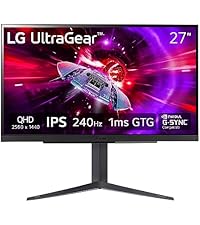
The LG 27GS60QC-B Ultragear is a 27-inch QHD (2560x1440) curved gaming monitor featuring a rapid 180Hz refresh rate and 1ms response time for ultra-smooth gameplay. Its 1000R curvature and 99% sRGB with HDR10 deliver immersive, vibrant visuals. Equipped with AMD FreeSync and gamer-centric features like Dynamic Action Sync, Black Stabilizer, and FPS Counter, it’s designed to give competitive gamers a decisive edge in both performance and style.




| ASIN | B0D2FZS3JM |
| Best Sellers Rank | #797 in Electronics ( See Top 100 in Electronics ) #35 in Computer Monitors |
| Brand | LG |
| Color | Black |
| Customer Reviews | 4.5 4.5 out of 5 stars (13,240) |
| Date First Available | April 22, 2024 |
| Item Dimensions LxWxH | 8.92 x 23.81 x 17.74 inches |
| Item Weight | 10.58 pounds |
| Item model number | 27GS60QC-B.AUSQ |
| Manufacturer | LG |
| Max Screen Resolution | 2560 x 1440 Pixels |
| Number of Processors | 1 |
| Number of USB 3.0 Ports | 1 |
| Product Dimensions | 8.92 x 23.81 x 17.74 inches |
| Screen Resolution | 2560x1440 |
| Series | 27GS60QC-B.AUSQ |
| Standing screen display size | 27 Inches |
B**S
Fantastic price to quality ratio
Overall fantastic monitor. 1440p is a solid choice for the 27 inch size, visuals are sharp without being too demanding on the GPU, colors are good with great whites and blacks. Refresh rate is solid (imo above 144hz gives diminishing returns in general, 240hz is overkill, at least to my eyes) Overall great for gaming, but also great for productivity work. Height adjustment is smooth and the monitor is comfortable to use.
D**B
The perfect Gaming/Office Display
I'd like to start by saying, ever since LG invented the wallpaper TV, I've developed loyalty, strictly on their displays for everything. They are cheaper then Samsung, yet more innovative, so, kudos. That said, if my review sounds at all biased, I'm sorry. There are no defects on the monitor I received. Ran an Ezio test and found nothing that stands out. Something to be aware of, is that if you purchase a VESA mount, it needs to be 100x100, and even if that mount has spacers, you may need some washers to compensate for a gap. The reason for this, is to keep the back flat and uniform when installing the stand it comes with, but considering monitors these days are naturally very thin, this causes a problem by limiting the female port length for the screws needed to secure a VESA mount. In my case, 8 small washers I had left over from other projects fixed this problem. Something else worth noting is it is Nvidia G-Sync compatible (there is an attractive sticker showing this monitor is capable of it on the bottom left that I'm assuming can be removed). My Nvidia GeForce RTX 2070 Super recognized that it is a G-Sync compatible monitor, and I was able to enable G-Sync thru the Nvidia Control Panel, however, when you view settings on the monitor itself, it is called "Adaptive Sync." From what I've read, this is because they used to be one in the same, and it works just the same as far as I can tell. Enabling it in the Nvidia Control Panel made the monitor settings show Adaptive Sync: Enabled. One feature I really liked that I wasn't aware of when buying this monitor, is that the settings button is a small joystick. If clicked in it opens the settings window, if towards you or away from you, it allows you to adjust the brightness, and left or right is headphone volume. Overall very nifty for one button. If you need a VESA mount but aren't sure what to get, this is what I ordered: VIVO Dual LCD Monitor Desk Mount Stand Heavy Duty Fully Adjustable fits 2 /Two Screens up to 27" (STAND-V002). Mine is a dual mount but you can choose between double and single. The mount itself is extremely sturdy. Zero wobble and aesthetically pleasing, as it has a cable management system and you can hide the VIVO logo on the main support pole if you want to (I did, I'm not the biggest fan of logos). But not to veer off the topic or review, 2560 x 1440 @ 144hz for under $400 from LG w/ G-Sync compatibility is the most perfect monitor I could ask for. 2k is ideal for gaming as 4k is too demanding for AAA titles (for about 90% of the Gaming PC Community and 100% of the eSports Community). One last thing I've noticed, is that I have had a 4k screen in the past, and noticed the resolution makes everything extremely tiny (the taskbar being the most obvious reference). 2k is the sweet spot, because it's not too small, but there is now enough real estate for a 27" monitor to be all I need (for gaming). When I get into photo editing, etc., I will likely purchase a 4k monitor, but only for shows, movies, and editing. I do self-taught audio production work, and 27" 2k is more then enough for me. Some producers use widescreen monitors, which is great for them, I'm sure, but not necessary after seeing this thing. Thank you LG, for the ultimate monitor, and thank you Amazon, for an undamaged product.
J**E
Fantastic monitor
180HZ refresh rate is smooth for high FPS gaming and the slight curve and HDR adds good immersion. The monitor turns itself on and off for you without any flashing lights that annoyingly shine at night. The menu is quite easy to navigate and has useful controls. Image quality out of the box is exceptional. The monitor is built well and is durable
Z**C
Awesome monitor
Looks great, haven’t had any trouble with the lighting or anything, 1440 lols great on my games and makes them crisp, good quality monitor for sure.
B**L
Solid Monitor, with a minor concern (for me).
I've owned LG monitors before (specifically an Ultra 4K). I bought this monitor for primarily the specs! I needed 1440p and 144Hz. I have come to realize that a 27" monitor is perfect for me, as 32" and higher tend to be less precise and detailed for this resolution. The brightness is OK, but the color is awesome on this panel. The only area that concerned me at all when I got it up and running is that there is a slight shadowing along the left and right edge of the panel. Not enough to scare me away, but enough that I noticed. I typically only notice it when I'm looking for it! Keep in mind when buying a monitor, there is always a bit of 'panel lottery' that you can look forward to. On the bright side, there were NO Stuck or Dead pixels on this panel. My last monitor (pretty much the same specs) had a couple of dead pixels that were unrecoverable. The GUI on the this monitor is accessed on the power button at the bottom of the screen. It is a joystick style button that is very easy to use and make changes with. My last monitor had four specific buttons on the bottom of the monitor to access the GUI. I can't tell you how many times I messed up navigating around with that setup. This one is quick and easy. The available settings are adequate, but not that robust. Enough to dial in the monitor with basic settings. The bezel is fairly borderless on the top and sides. But even though the panel goes almost to the very edge of the display, the lighted area of the panel still leaves a about a quarter inch black border on those three sides. The bottom border has the LG logo, and is about 5/8" tall. The display powers on fairly quickly, and doesn't annoy you with a manufacturers splash screen. It only takes a couple of seconds for power-on to ready! Windows 10 recognized this monitor right away when I hooked it up, and even set itself to 144Hz without me doing anything at all. It is nVidia compatible, and is on nVidia's approved list (my last monitor worked just fine, but was not on the approved list). I got this when it was temporarily price reduced, so keep your eye on it, or put it in your wish list items and wait for it to go on sale. This one went on sale, and was sold out on Amazon within half a day. The price jumped almost 30% later the day I bought this one, and was no longer in stock. I don't think you can go wrong with this product, and would recommend it to almost anyone.
D**Y
Whilst not the most accurate colour, for the price, these are great panels for additional monitors. I have 1 either side of my main graphics monitor.
D**O
Great curved monitor. Easy to set up and so far works well.
C**N
Pasé de un Samsung 4K con panel TN a este modelo de LG y el salto es descomunal. Juego bastantes FPS y evidentemente ayuda muchísimo, pero no sólo por los FPS o el Refressh Rate, la imagen en sí mejora muchísimo. Incluso si juegas cosas como GTA V o Just Cause o cualquier juego que no necesite el refresh alto como los FPS, la imagen se vuelve más definida y es un gusto jugarlo. Me dedico a hacer contenidos multimedia y lo primero que noté con el panel IPS es que el texto es muuuuuucho más nítido. La claridad y definición de las caracteres no se compara con el del panel TN. Hablando de la edición de video y motion graphics, el color cambió muchísimo; si has investigado un poco, sabrás que los IPS son recomendados para diseñadores y editores y vaya que cambia. Si sólo vas a jugar y te importa la rapidez de respuesta en FPSs y no tanto los colores (sólo lo usas para jugar y ver alguna serie o videos de YouTube), uno con Panel TN puede ser una buena idea para ti, además de ser muuuuucho más barato con 144 Htz y 1ms. Si lo usarás para trabajar en creación de medios audiovisuales, es perfecto, pero creo que está sobrado si SOLO lo usarás para eso. Hay monitores de panel IPS a 60 htz que te quedarán de lujo y a menor precio. Este monitor está dirigido para los entusiastas del gaming y que, además, quieren colores fidedignos y pretendan sacarle provecho a los 144 htz (o 120 o 100), o sea, que su hardware pueda sacarle jugo a eso (el Nintendo Switch no tiene contenido a ese refresh rate ni es compatible con Adaptive Sync, por ejemplo). El modelo que adquirí fue el 27GL83A que no cuenta con hub USB, pero lo hice así para ahorrar 3,000 MXN y porque realmente no necesito ese hub. No podré actualizar el firmware por esa razón, pero tampoco es necesario; no es como que tu monitor cambie el refresh rate o funcionalidades óptimas por ello. Conclusión: Si juegas FPSs, brincar a los 144hz cambiará tu vida. Si trabajas en medios audiovisuales y tienes un TN, también cambiará tu vida (aunque podrías conseguir uno con panel VA a buen precio y buenos resultados... no los mejores colores pero mejor que el TN).
R**M
كنت محتارة مره بين شاشات كثير لكن هالشاشة ماشاء الله كل من شافها عجبته ومريحة للنظر كنت العب بشاشه asus ips ولكن كانت تخلي عيني تدمع واحس فوقها طبقه رمادية باهتة وهالشي كنت متخوفه منه لكن ذي الشاشة على كثر ما جلست عليها ما اذت عيني وعلى فكرة هالنقطة ممكن البعض يعتبرها سلبية ولكن اي شاشة سماعتها لك عليها مافيها سماعة يبيلها بار ستوديو سماعة خارجية وانا العب ps5 وتوصل 120هرتز مو 60 صراحة تعمدت اكتب تعليقي بعد ما اخذ وقتي بتجربة الشاشة والصدق انها جبارة واشوف الوانها رهيبة كان ودي اخذ oled ولكن ما ندمت على هالشاشة ابدًا ولو يرجع فيني الزمن بشتريها مره ثانيه وخفيفه توقعتها اثقل من كذا
ش**ث
Amazing for Xbox s or PS5
Trustpilot
2 months ago
2 weeks ago



