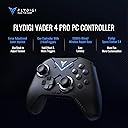
🎮 Elevate Your Game with the FLYDIGI Vader 4 Pro!
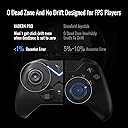
The FLYDIGI Vader 4 Pro is a versatile multi-platform gaming controller designed for serious gamers. With features like a force-adjustable joystick, 1000Hz polling rate, and immersive stereo vibration, it offers a customizable and responsive gaming experience. The 800mAh battery ensures long-lasting play, making it the perfect companion for PC, Nintendo Switch, and Android gaming.


| Button Quantity | 14 |
| Additional Features | Wireless, Ergonomic, Motion Sensing |
| Power Source | Battery Powered |
| Hardware Platform | PC |
| Controller Type | Vader 4 Pro PC Controller |
| Connectivity Technology | Wireless, Bluetooth, Wired |
| Compatible Devices | Nintendo Switch, PC, Windows, Android |
| Package Quantity | 1 |
| Color | Vader 4 Pro PC Controller |
A**Y
Best entry-level pro-controller....maybe best overall
Before I start, I want to say that I recommend watching reviews of this controller on YouTube. (I’m going to comment on my specific unit). There is no shortage of them given the hype surrounding this unit and FlyDigi’s high-profile status. Personally, I would recommend the one by Gamer Heaven. Pugh’s Review was also good, and I assume VCuda’s will also be good once he finishes editing it. (All 3 have no problem calling out a problem if they see one, so I’ve come to trust them). I’ve only just started using this controller (on Ghost of Tsushima, and tested the d-pad specifically on FighterZ), but when I first picked it up….wow, I was floored. It had the best hand-feel I’ve experienced yet. Had enough weight that it felt of sound build-quality. I’m very glad they decided to add texture to the back, and this is the first time I’ve seen the texture on the “face” of the bumpers (L1 & R1), as opposed to the underside of them (which SHOULD be the norm, but isn’t for whatever reason). The buttons are in good positions and they all actuate very well. Honestly, the bumpers and triggers are the best I’ve ever felt. FlyDigi is known for good bumpers (--- as far as I’ve heard, I’ve only had the Vader 2 previously but this applies to them, too), able to actuate them with any part of your finger (tip, middle, etc). When in analog-mode the triggers are the best I’ve felt. Previously even triggers I’d consider good still felt hollow and I could imagine seeing an empty trigger push a little spring down to the magnet sensor (assuming hall-triggers). These however, feel “full”. This might just be because of the vibration in the triggers, but it definitely makes me feel more confident in the build quality. In digital/stopped mode, the triggers have a very satisfying click. Lastly, with the Vader 2 my biggest gripe was that when you pressed the triggers all the way in with the body of your index finger (I tend to do this, as opposed to the tip, clicking), you’d hit the shell of the controller because they depressed so deeply. With the 4 Pro, the body doesn’t jut out as much and the triggers don’t sink so deeply, so it feels much better even with my (possibly) atypical pressing method. Speaking of controller vibration, this is my first controller to have vibration that is more advanced than the typical half-cylinder spinning in the handle, and I must say it CLEARLY feels better. I didn’t think I’d care, but it’s pretty cool. The mechanical face buttons are great. Not much more to say. It’s my second controller with them and I really prefer them. The 6 macro buttons, despite not being mechanical, all actuate well and are in *good enough* spots. The 2 under the body aren’t quite as good as the 2 under the handles, but they’re fine. Personally, I think manufacturers should place 2 each under the handles (it’s rare, but I have seen this set-up. Unfortunately, not on any hall-effect controller). Also, what would really put this controller even further over the top, would be moving C & Z (or just adding 2 more buttons) to the shoulder area (by the bumpers & triggers). Ditch the cell-phone holder attachment point, I doubt many people use that. 2 buttons there are very ergonomical (on other controllers I’ve used), and you don’t have to take your fingers off the sticks to use them, like you would with C & Z at their current locations. The sticks are great, as are the tension rings. They’re easy to change and the sticks rotate smoothly at various tensions. Before this even came (which, it came in a couple days despite predicting a couple-weeks (ie: directly from China) -so, bonus points here), I purchased FlyDigi replacement (taller) sticks, and they attached very easily (and I really noticed the difference). If you’re interested in those – get them from AliExpress. They’re under 1 dollar there, compared to 20-something on Amazon (& zero shipping!). I tested the stick circularity on both the circular & square algorithms, and I’ll just summarize by saying they were very accurate. At first the snap-back didn’t *seem* great, but that’s because the controller is more transparent in regards to the actual values being produced (while some controllers run algorithms but don’t tell you). When the sticks are not moved for 3 seconds, they auto re-calibrate to a perfect center (assuming you leave that option switched on). ADENDUM (because I didn’t get around to posting this review right away): While video reviews I watched said the tension rings “probably” wouldn’t move during gameplay, that it took some effort – I’ve found this to be untrue, at least when you have the sticks set looser. I began playing a game without aiming (the right stick is just a camera), so I made both sticks 3 notches above Min, and with a gameplay session (2ish hours) with lots of flicking the camera around (I like to take in the whole environment, lol), I found it went 1 or so notches looser (& this has happened enough for me to accept this will continue to happen). When I was playing GoT & had the right stick at max (for bow-aiming), it never did this, though. For whatever reason, the left stick didn’t seem to get more loose (though, if you were playing a FPS with erratic back & forth flicking, I could see this happening). If your right stick isn’t for aiming, & already set fairly loose, it shouldn’t matter if it’s getting even more loose (based on that game style), but I wanted to be clear that it’s something that happens. I tried setting them to 4 above Min, and didn’t find them to have moved at all, after that. As I said, I tested the d-pad in a fighting game, doing quarter-circle movements, and it was as smooth as butter. Like with the sticks, I don’t have much more to say, the quality is very good. The battery life has been great so far (no light, and moderate vibration). I charged it once “accidentally” because I thought it died, but actually I had somehow hit the mode button over to Switch-mode (& it stopped working in my PC game). Since that charge, I still haven’t had to recharge it for decent number of 2ish-hour gaming sessions. (I don’t know about most people, but something like 6+ hour sessions are rare for me, so anything really is fine. I keep a back-up wired controller nearby, and I don’t mind plugging a wire into this controller if it comes to it). Finally, the software suite is great. I was familiar with the older version used with the Vader 2, and this one adds even more options. No complaints so far (though I do echo the sentiment that it would be nice to be able to change the window-size).
M**O
Feature rich and a reliable performer
I learned of the Flydigi Vader 4 Pro after watching a few reviews and scouring Reddit. Some reviewers were saying it was the better controller over the Gulikit KK3 Max, which is the same price, and so I pulled the trigger and ordered it. When I unboxed the controller, I was impressed. It instantly felt good in my hands. It’s not a large controller and works with my smaller hands. It has a stout feeling without being heavy and I can hold on to it for lengthy gaming sessions without fatiguing. Everything about the controller feels quality. The Hall Effect joysticks feel like joysticks and the force-adjustment feature sticks into place. They’re also markings on them so you can easily synchronize them with one another. They come off a little too tall and it is difficult to reach the select button from the left joystick. I find myself lifting my thumb over to hit the button. Triggers are quality and the vibration is crisp and confident. You’re able to instantly change from a mouse click to a pull, but it takes a little fidgeting with. The clicky primary XYAB buttons are reassuring and snap back quickly. The additional C and Z buttons don’t get in the way. In fact, they can be a little hard to find with your thumb. Their placement also feels a little unnatural. But if you can get used to it, then being able to program macros to them is a nice feature. The four back buttons are useful. They take a little getting used to and are easy to mix up with the trigger switches, but they are good for macros. I primarily play Helldivers 2 and being able to program stratagems to the buttons is super convenient. The home and function buttons are there. They’re hidden behind the right joystick and directional pad and are kind of hard to find. But I rarely need them, so it’s not really an issue. It does take forever to turn off the controller, but I discovered it has a sleep function, and now just leave it to that. The lighting is cool, and I leave it on. You can adjust it in the software to flicker fast or stay stagnant. The FlydigiSpaceStation software is effective but a little sketchy. It requires additional downloads and permissions. I advise you to tread carefully. But with this software, you can truly customize the controller to your fancy and it’s easy to figure out. It’s a little buggy and you need to update everything (i.e., the software, the controller, and the dongle.) Overall, I highly recommend the controller. I’ve used a DualSense for years now and this is lightyears better than those. For starters, drift is no longer an issue with the Vader. I’ve gone through 3 DualSense controllers because of that issue and was growing frustrated. I initially went with the 8BitDo Ultimate Bluetooth, but the right button was dead on arrival. So, I returned it. Nothing of the sort occurred with the Vader. It worked perfectly and after some tinkering, I got it all figured out. If you’re on the fence, don’t be. Buy it.
R**D
Most satisfying controller I’ve used.
I am a mouse and keyboard player, but I decided to give controller a go a couple years ago. I looked and looked before finally settling on Scuf last year. It’s meh, honestly. I’ve tried so many “high end” controllers looking for one that feels high end. When I took the Vader pro out of the box, I immediately noticed how it feels like a high end, quality controller. The feel of the thing set a high standard. Using it didn’t let me down. The sticks are BY FAR the best ones I’ve ever used. The tension adjustment is amazing, and I love being able to fine tune my controller this way. The software is easy to use and remapping buttons takes a second. The internal specs of the controller are the best I’ve ever used. Joystick accuracy is 12 bit, which means your fine movements are perfectly reflected on screen, I.e. your stick goes where you want it. You gotta try it. For reference Xbox elite 2 is 9 bit and Sony PS Dualsense and Dualsense Edge have 8 bit. The feel is unlike anything I can describe. You have to kinda relearn a bit because your brain has adapted to the imperfections of the previous controller and poorer accuracy. Once you get used to it though… omg so satisfying. It feels like aiming with a mouse. No BS. Buttons feel clicky and satisfying to the press. Similar to the scuff. The back buttons are in an okay spot. I have adjusted to them fine. This is one area I prefer the scuf envision pro, back button placement. Not a dealbreaker by any means and I think I just got used to scuf. I am adjusted know and barely remember scuf lol. CONS: - It’s kinda small… I am a big guy with big hands and at first I didn’t think I would be able to play with this controller, despite loving everything else about it. In the last couple days uve actually started to notice that the size isn’t bugging me anymore. I’ve adjusted. Give it a chance, but it is small. -Xbox stick layout. Some may disagree with this being a con, but my brain loves the symmetry of the ps5 layout. As with the other things, I've adjusted and barely notice anymore. Overall- this is the only controller I’ll use. I’ll always be on the lookout for something better but honestly I can’t imagine how you beat this other than making the same exact thing a little bigger with ps5 button layout.
D**E
Almost Perfect!
I have been looking for a controller that can do very specific things and the Vader 4 Pro ALMOST did everything! Nonetheless, it is a great controller. This is after testing 7 controllers in the past week. The good: 1. Works with Cloud Gaming (Game Pass, GeForceNow, Luna) on Meta Quest 3. A surprising number of controllers do not map properly with cloud gaming and this one actually works properly. 2. Hardware triggered gyro. This controller lets you use gyro aiming on any platform as you can activate the gyro with one of the extra buttons or the left trigger without any software assistance. 3. Trigger locks. They are amazing on this thing. 4. The stick tension rings are game changing. I didn't even know I wanted this, but now I can't live without it. 5. Build quality. This is one of the best feeling controllers I tested. Only the GameSir G8+ felt as solid as this one. 6. 6 Extra Mappable Buttons! The two on the front are really great. Again, I didn't really need this, but I sure don't mind it. The frustrating: 1. High polling rate bluetooth option: In Switch mode there is 500Hz polling rate! However, the mapping options for Switch mode are not that great. Specifically, you cannot trigger the gyro manually in this mode. My ideal controller would have a high BT polling rate AND control over the gyro. Unfortunately, this controller makes me choose between these two features, they cannot be used together. 2. On the fly profile swapping: You can switch between 4 configurations by hitting Select + A/B/X/Y. This is a really cool feature, BUT it is basically unusable in-game. Hitting these button combos in-game will obviously cause a whole bunch of problems. I thought of a workaround by disabling the select button and mapping it to one of the mappable buttons. It would appear this activation combo is tied to the hardware buttons, not the signals they are sending. So now my select button is on the back of the controller. It can be annoying, but it generally works as long as A/B/X/Y do not cause a disaster when you hit them to change profiles. I assume you can map those to the extra buttons as well and disable the hardware, but that would be really annoying. The bad: 1. Doesn't work with Cloud Gaming on Samsung The Frame TVs via bluetooth. Controller connects, but buttons are mapped incorrectly. However, the 2.4GHz dongle does work with the TV and it actually maps correctly. I am just going to have to leave the dongle plugged in the TV which is kind of annoying. 2. Low polling rate over bluetooth in standard (not switch) mode. This is the most disappointing part. The bluetooth polling rate is abysmal. There are reports of 250Hz polling on this controller, but I am unable to get over 90 or 100Hz through my testing. This makes Bluetooth almost useless.
A**A
Very very good controller for the price
In terms of rankings this controller is up there with the higher quality ones. I didn’t realize that there could be such a quality difference. This is two tiers above the Manba and one tier above the Xbox controller imo. You name the category, it is better. It feels like it is higher quality, button presses feel similar to a mechanical keyboard press, lighting options, fine tune adjustments, tunable idle sleep mode, extra buttons that you can bind to your mouse or keyboard, no stuttering, no lag, input consistency, vibration feel, the switch on the bottom makes it easy to switch from my pc to firestick (android), trigger feel, joystick mod, in game deadzone remains ultra low since purchase (0.04), no calluses from extended play on claw grip, Eventually I’ll dock it. Only minuscule things are that this controller has a weird slot in the front for a separate product, and that the Manba tells you battery percentage while the controller just has a tiny red-orange light that is easy to miss when locked in a game session. If the chevron light/rumble motors/app were able to notify me about my battery that would be a cool addition. My controller has not died on me while playing yet. I charge every two gaming sessions and I play for hours (like overnight hours on games like RL) with the light’s brightness at the lowest setting. Also clean it if you’re a sweaty tryhard in your game.
N**S
Alllllmost perfect.
My Beitong Asura 2 Pro was losing its edge and I saw in the recommendations the Vader-4. With all its bells and whistles it looked like a good bet. Installed the config software, made some adjustments, and put in some game time in Halo Infinite. Let's do the breakdown! Positives first. The construction is STURDY. Weighing about as much as the Asura 2, still less than the Power-A Fusion 2, but feeling more substantial in the hand than both. Every face button is extremely satisfying to use. Good clicky feedback. The analog sticks feel fantastic in their throw. The adjusters remove the need for anything third party like precision rings, and are very straight forward to use. The trigger stops allowing for change from a full throw to a quick click is FANTASTIC. Genuinely impressive design. The macro buttons along the back are all in good positions and easy to reach. Thr configuration software is also great. Easy to find, install, and use. Very user friendly. I said in my review of the Asura 2 that a good controller won't change your life, but just doing the job well and over time makes the biggest difference. You don't want to have difficulty while you're playing and constantly be suspecting your controller. Which brings us to the bad. It's a short list though. The Vader-4 and the the Asura-2 use the SAME. AWFUL. ANALOG STICKS. Points to the Vader for using rubberized ones instead of bare plastic ones like the Asura, but the pads are HUGE. Bigger than any controller I've ever seen or used other than specifically in this class of controllers. And they just... feel wrong. Maybe others aren't bothered, but essentially they're a concave dual shock style stick and for some that'll be fine, for me twice now it's just a plain "no". Just like with the Asura, I changed out the sticks to the sticks I originally had in the PA Fusion. Unlike the Asura, I came up against the build quality of the Vader which is seemingly complex beyond reason. This isn't an official review complaint, just a nitpick as an enthusiast who has dismantled a LOT of controllers. A four screw shell with additional plastic clips that have to be PRYED APART is either an anti-tampering design or someone was feeling extra mean in the design phase. I've never spent so long trying to dismantle and put a controller back together. EVER. But these are only problems if you really dislike the sticks like I do. And strangely enough? The original pads just pop off, ready to receive another pad like you see on the picture... but uh... they don't sell one. So maybe a pad assortment could be a option to buy in the future? Easy way to fix this whole situation, I'd say. Only other thing, the D-Pad is too large for how close it is to the left stick. Its design is riffing on the XB Elite 8-Way pad, which is neat. But it's not removable and at least on my experience so far you hit it accidentally. A lot. Because it's also sensitive (which is a plus. Good switches). Overall, I tear through controllers a lot. I can definitely feel and see where the money goes with the Vader-4. With the new sticks in, it feels amazing (I don't recommend trying to change them). It's recommend this to you or a friend, anyone not nearly so picky as me. And as for me, I have screwdrivers and time and I made it a great controller for *me* that I'd happily buy again.
J**N
This is a controller done right. Exceeded all my expectation!
I've been using FlyDigi Vadar 4 Pro for about a month now, and if you’re on the fence, I can confidently say it's worth the price. Quality (10/10): The controller feels well-built and premium in hand, definitely a standout in terms of durability and materials. Cost (10/10): Very affordable compared to the competition. I’d put it on par with the Xbox Elite 2 and KK3 Max in terms of value. Feel (10/10): The ergonomics are fantastic, with comfortable buttons, triggers, and a responsive d-pad. Even during long sessions, I haven’t experienced any hand fatigue or cramps. Technology (10/10): This controller has everything you need. The 2.4 GHz dongle gives lower latency on PC than even the official Xbox controller. The hall effect thumbstick, extra buttons, and trigger adjustments all work perfectly. Plus, the thumb sticks come with adjustable strength rings to control stiffness on the fly, which is a feature I love! The added features aren’t gimmicks; they’re genuinely useful. Zero complaints here. App (9/10): The PC app, "FlyDigi Space," is excellent and packed with features. I docked a point only because I wish some features had clearer explanations—just a short description would go a long way. Battery (9/10): Battery life is impressive. The only reason I deducted a point is the lack of a wireless charging option like the 8Bitdo or replaceable battery like the Xbox Wireless Controller. Overall (20/10): I own over eight controllers (Xbox, PS, Game Sir, 8Bitdo, and Gulikit), and this has quickly become my favorite, with the others starting to gather dust. Each one of my old controllers left something to be desired, this one didn't. Even the points I deducted are very minor inconveniences I am willing to work with. If someone asked me for a recommendation, I’d pick this one with no hesitation.
L**N
No Stick Drift EVER
Im not smart enough to give you a comprehensive review of this controller. So id suggest you look up videos by VCuda and GamerHaven on youtube. both have great deep dive videos on this controller and many others. But for me its the best hands down. (Keep in mind i ONLY use this on PC) Heres my take away after about 4 months of use: -4 re-programable back buttons and 2 more "C" and "Z" buttons on the front. - both joysticks are not just hall effect, but use Flydigi's inhouse special sauce instead of springs that are supposed to never wear out. so no joystick slop or drift. -Adjustable tension rings for the joysticks to set your preferred centering strength. -Quick swappable triggers that go from digital mouse click to full sweep analog. (FPS shooters VS Racing games are an example of why) -every button on the controller is also a Keyboard style short travel "Clicky" Switch. -1000hz response time for wireless. And that not even touching on the surprisingly useful (OPTIONAL) software for it called "Flydigi Space" -lets you set all the buttons on the controller to any controller and/or Mouse+Keyboard input. -Set the joysticks output to a perfect Circle or Square (some games are calibrated for one kind or the other, so being able to choose on the fly is very helpful) -Setting ANTI-DEADZONES for the joysticks to cancel out any games baked in deadzones. (this is a hugely helpful thing as some games have huge default deadzones that you cant adjust) -And all changes applied to the controller are saved to the onboard memory (this means they persist even after you kill the software, and happen at a driver level, so 100% compatibility in any game.) And many more tweaks i cant even remember off the top of my head. This is by far the best controller ive ever owned. it blows every other pro controller on the market out of the water.
Trustpilot
2 weeks ago
1 month ago