
DOWNLOAD THE APP


Customer Services
Copyright © 2025 Desertcart Holdings Limited
DOWNLOAD THE APP
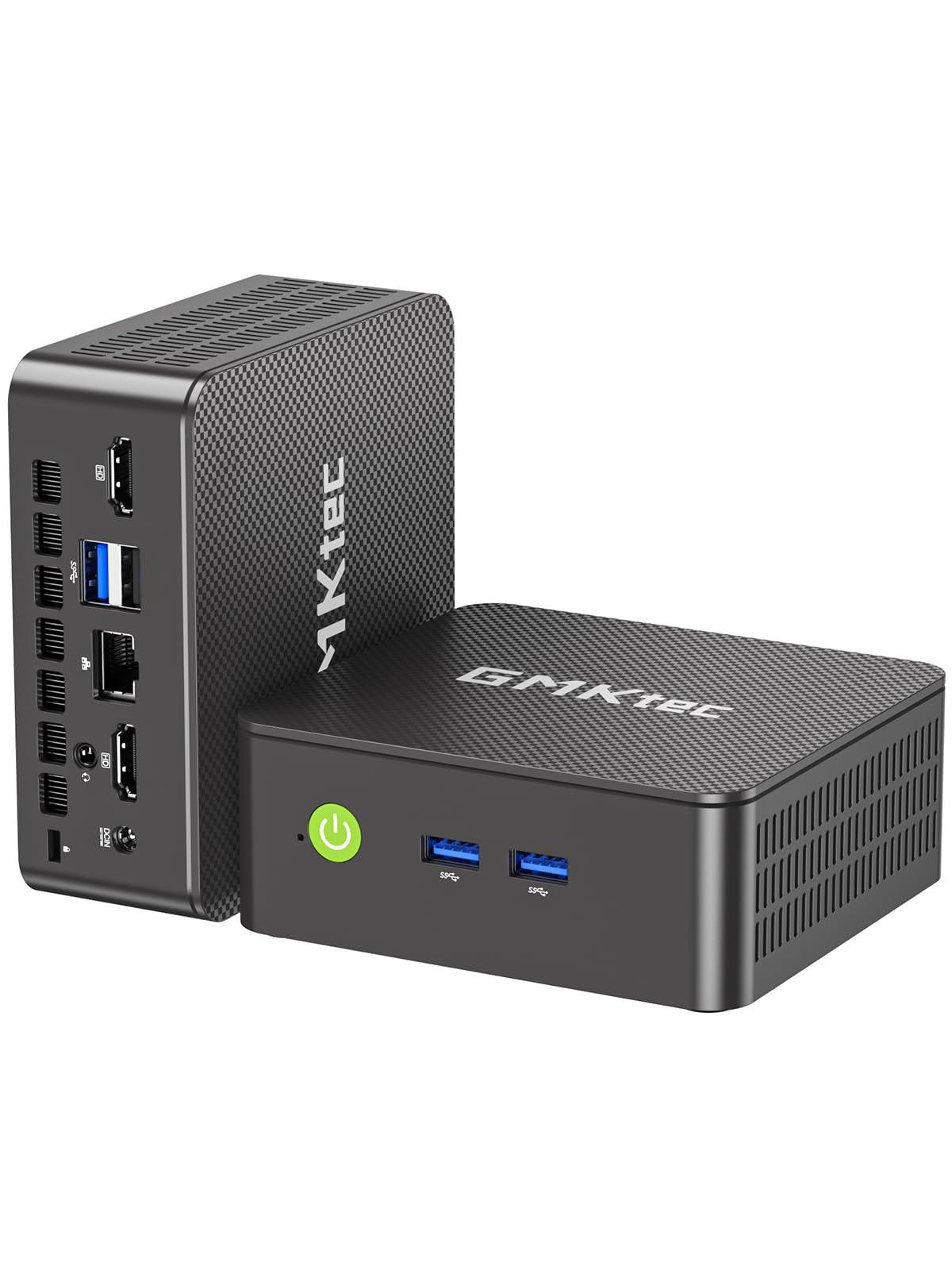
🚀 Power-packed Mini PC that fits in your palm, but rules your workspace!
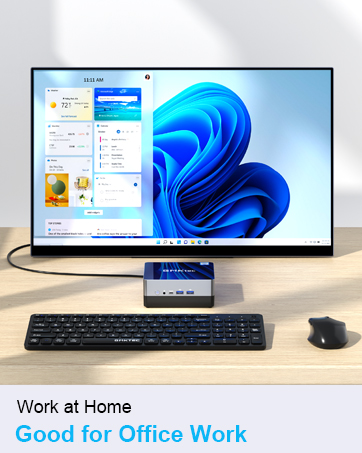
The GMKtec K13 Mini PC is a compact powerhouse featuring Intel's Ultra 7 256V CPU with up to 4.8GHz turbo, 16GB DDR5 RAM, and a 512GB PCIe 4.0 SSD. It boasts an Intel AI Boost NPU for advanced AI tasks, Intel Arc 140V graphics for gaming and creative apps, and supports up to four 8K displays. With 3 M.2 expansion slots, 2.5GbE LAN, WiFi 6, Bluetooth 5.2, and an Oculink port, it delivers professional-grade connectivity and performance in a sleek, ultra-portable design perfect for multitasking, gaming, and AI workloads.











| ASIN | B0GGBCKJMR |
| Best Sellers Rank | 9,735 in Computers & Accessories ( See Top 100 in Computers & Accessories ) 41 in Desktop PCs |
| Box Contents | 1*GMKtec NUCBOX |
| Brand | GMKtec |
| Brand Name | GMKtec |
| CPU Model Number | Intel® Core™ Ultra 7 256V |
| CPU Model Speed Maximum | 3.7 GHz |
| CPU model | Mobile CPU |
| CPU speed | 2.2 |
| Cache Memory Installed Size | 512 GB |
| Cache size | 512 GB |
| Country of Origin | China |
| Customer Reviews | 4.5 out of 5 stars 1,014 Reviews |
| Graphics Card Interface | Integrated |
| Graphics Card Ram | 16 |
| Graphics Description | Integrated |
| Graphics Ram Type | DDR5 SDRAM |
| Graphics card description | Integrated |
| Hard Disk Description | SSD |
| Hard Disk Interface | PCIE x 16 |
| Human Interface Types | Pinyin Keypad |
| Manufacturer | GMKtec |
| Model Name | GMKtec NUCBOX |
| Model Number | Nucbox K13 |
| Operating Systems | 11 Pro |
| Operating system | 11 Pro |
| Power Plug Type | Moulded 2-pin BS 4573 UK Shaver plug |
| Processor Brand | Intel |
| Processor Series | Mobile CPU |
| Processor Socket | TSMC N3B |
| Processor Speed | 2.2 |
| Product Warranty | 365 days |
| RAM Memory Installed | 16 GB |
| RAM Memory Technology | DDR5 |
| RAM Type | DDR5 SDRAM |
| Ram Memory Maximum Size | 16 GB |
| Specific Uses For Product | Everyday Use |
D**Y
Amazing mini PC for retro gaming, streaming and general office work!
So declaration of interest, I have a GMKTek G3 already (N150 model) and thought I'd buy a second one for a dedicated TV box to play retro games. Amazon did a superb job with same day delivery and I've spent the evening setting it up. First impressions: This thing is tiny! See the photos, the device was supplied in it's box without any additional packaging which was about the size of 2 iPhone boxes stacked on top of each other! It truly fits in the the palm of your hand and you could really flip it into your backpack and take it anywhere with you! Specs and ports: The device is powered by Intel N97 processor, 12gb soldered on DDR5 ram (CPU-Z identifies these as Samsung), and has a generic TSCW 512gb SATA drive. In terms of connectivity, the device has 2 x USB 3 A on the front, one on the back as well as a single USB C port. Please note that the USB C port is only used to supply power. I tried it with my Anker Gan C charger and no issues at all. There are two HDMI ports and handily a TF card reader which is brilliant if you like retro games/handhelds. It's something that was dropped from my daily driver (Intel NUC) which I do miss. Set-up: On first boot, the G5 expands a pre-imaged W11 Pro installation that takes some time. After that, updates can take a couple of hours, I left this on and walked away for a bit. One thing to note is that the device comes preconfigured to go to 12W max, I changed this in the BIOS to 15W max and only got a marginal increase in fan noise. Performance & speed: This PC is suitable for casual office use with no issues with Word, Excel, Powerpoint 365 and general internet browsing. I left it streaming Youtube 4K for a bit to see if it would overheat and no issues there. I did a slightly unscientific test and zapped it at 30cm distance with my heat camera pointed at the side vents and about 42 degrees after general use. Storage: There is a generic TSCW 512gb drive in there which I tested with CrystalDiskInfo 8 and I've uploaded a screenshot of the speed. Ok for casual use and I'm not sure if it's upgradeable. Overall: This is an excellent Mini PC for those looking for office work, retro gaming, server/media home use. It's been stable, whisper quiet and I think I'll replace my GMKTek G3 with this as it's quite a bit smaller under the TV and can take a USB C supply which makes travelling with it really easy! 5* from me.
J**K
Great affordable and tiny pc
This tiny gkmtec G2 plus has exceeded all my expectations. When I received it I immediately wiped it and did a fresh install of windows 11 pro as I'm very picky about my windows installation and like things set up and running to my own standards and with as little interaction with Microsoft etc as possible. After installing windows 11 pro I installed the appropriate drivers which I had already downloaded from the gkmtec website. This was easy to do as the site is well laid out. I then installed software like Libre Office, Adobe Photoshop, Brave browser, Surfshark VPN and much more. Everything is running fine and quite speedily considering the tiny size of the computer. Browsing is quick, 4k video playback impressive and editing in Photoshop a breeze. I also like retro gaming and I made a bootable install of Batocera with many emulators. These included Megadrive, SNES, N64, GameCube, PS2 etc etc and again everything runs great. I really didn't expect this tiny and affordable pc to be so good and I really am impressed by it. But it with confidence.
S**N
Great, compact product
Great, compact product - setup and working as my home assistant server. Lots of CPU headroom and 16GB RAM is plentiful to also use as a frigate server and DIY NAS when connected with a DAS via the USB 3.2 port. So far so good - the performance for its size is impressive.
G**Y
You get what you pay for but this its a.good buy.
For the.price the speed and quality are ok im just missing a few more usb slots cos just 3 wont allow me to connect a gaming controller.Just the Wifi the mouse and keyboard plus my usb speakers so im already looking to replace it i should have really looked closely.Its really small and fits in my hand.Almost no noise or heat after long usage.so i recommend it gladly.
J**E
Impressive. Most impressive.
Bought this after my long-serving media centre PC died recently. That was an Asus Vivomini that cost £600, this is an unknown brand that costs £150. It does exactly the same things and performs admirably! If you'd told me a few years ago you would be able to buy a fully featured Windows pc for that price and it would literally fit in the palm of your hand, I'd have told you where to get off. :-) It's literally that. A PC. If you hadn't seen it's absurdly small size you'd just think you were using a normal desktop machine. It's not laggy or dodgy. It has WiFi and Bluetooth and an SSD. It has 3 SS USB3 ports. It runs nice and cool and the fan is barely audible. You're unlikely to be playing any modern games on it, but I use it as I did my last living room PC: to "buy" films off the Internet and watch them. And for that, it's perfect.
Y**L
Insanely small but powerful
An excellent bit of kit ,outputs on 2 monitors in 4k 60hz with no issue what so ever,brilliant for watching movies on etc,and I can play Half Life 2 on it ,so all is good.
E**E
Packed up after a few hours
The good points - small, cute, plenty of sockets, supported 3 monitors (one at 4k, 2 at FHD, well within advertised capabilities) for about ten minutes. Then refused to come out of stand-by. Nothing happened on rebooting, apart from lots of pretty lights on the box. Even unplugging two of the monitors to ease the load did not help, no start up splash screen, no progress to a log in screen, nothing. Other reviews state that customer support is non-existent, even if it was there, I don't see how they could help with a pc where you can't get a screen to show you options. So back to Amazon it goes. Shame, because it did look good for a few minutes.
D**H
VERY good so far!
This is just an initial first impression which I will add to as I spend more time with the NucBox. I booted it up today as it's getting close to 30 days since I bought it so thought I'd better check it is working. Just did a basic setup required to have it running. Put it on the internet & my network with wi-fi - which it DOES have but this isn't actually mentioned in the specs. I signed in to my Microsoft account & was pleasantly surprised to find I can use the facial recognition on my iPhone to log into the Nucbox & the MS account at the same time on boot. Very handy! (also this works with Android obviously) - Frankly I'm amazed at this thing given the minuscule size & paltry cost!!! The quality of the desktop graphics looks superb & sleek on a 4k 32" screen.. Kinda nice to be back with windows again!
Trustpilot
1 month ago
2 weeks ago