We remain fully operational. Our teams are working around the clock to ensure your deliveries continue safely.

DOWNLOAD THE APP


Customer Services
Copyright © 2025 Desertcart Holdings Limited
DOWNLOAD THE APP

🚀 Power your next-gen rig with the X870E AORUS Elite — where speed meets seamless sophistication!
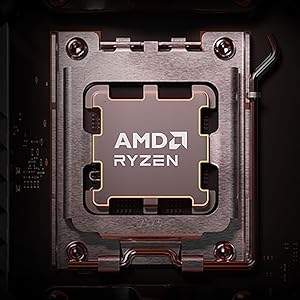
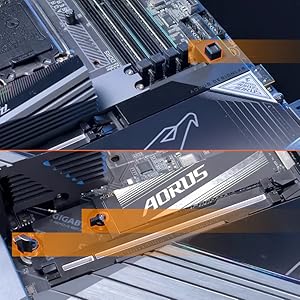
The GIGABYTE X870E AORUS Elite WIFI7 motherboard supports AMD Ryzen 7000-9000 series processors with a robust 16+2+2 power phase design and DDR5 memory up to 256GB. It features cutting-edge PCIe 5.0 connectivity with four M.2 slots, dual USB4 ports, WIFI7, and 2.5GbE LAN for ultra-fast data transfer. Designed for easy assembly with EZ-Latch and backed by a 5-year warranty, it delivers premium performance and reliability for high-end PC builds.




| ASIN | B0DGVBM73J |
| Best Sellers Rank | #19 in Computer Motherboards |
| Brand | GIGABYTE |
| CPU Model | Ryzen 7 |
| Chipset Type | AMD X870E |
| Compatible Devices | Personal Computer |
| Compatible Processors | AMD Ryzen 7000 series, AMD Ryzen 8000 series, AMD Ryzen 9000 series |
| Customer Reviews | 4.2 4.2 out of 5 stars (203) |
| Graphics Card Interface | PCI Express |
| Item Dimensions L x W x H | 13.4"L x 10.8"W x 3.3"H |
| Item Weight | 5.07 Pounds |
| Main Power Connector Type | 24-Pin |
| Manufacturer | GIGABYTE |
| Memory Clock Speed | 5600 MHz |
| Memory Slots Available | 4 |
| Memory Storage Capacity | 128 GB |
| Model Name | X870E AORUS ELITE WIFI7 |
| Model Number | X870E AORUS ELITE WIFI7 |
| Number of Ethernet Ports | 1 |
| Number of Ports | 14 |
| Platform | Windows 11 |
| Processor Socket | Socket AM5 |
| RAM Memory Technology | DDR5 |
| Ram Memory Maximum Size | 256 GB |
| System Bus Standard Supported | PCIe 5.0 |
| Total Number of HDMI Ports | 1 |
| Total PCIe Ports | 4 |
| Total SATA Ports | 4 |
| Total Usb Ports | 10 |
| UPC | 889523045237 |
| Warranty Description | 5 Year Manufacturer |
S**M
Fantastic Motherboard – Easy Assembly, High Quality, and Seamless Experience!
I recently completed my PC build using this motherboard, and I couldn’t be happier with the overall experience. The build process was incredibly smooth — installation was straightforward, the layout was intuitive, and all the connectors and headers were well-placed and clearly labeled. Even as someone doing a full custom build, I had zero issues during assembly. The quality of the board is excellent — it feels solid, well-built, and reliable. BIOS setup was simple and responsive, and it handled all my components perfectly right from the first boot. I especially appreciated how hassle-free it was to connect everything, from the CPU cooler to the GPU and memory, without any awkward angles or tight spaces. Overall, this motherboard made my entire PC building experience easy and enjoyable. It’s a great choice for anyone looking for performance, durability, and a truly user-friendly design. Highly recommended!
R**D
Great motherboard even with minor issues.
Works great. Once you get driver's installed it connects perfectly. My only issue was slight damage to the io sheld (outer package not damaged) which didn't effect the performance, and I had a false VGA error light which was cleared with a reset with a restart and again does affect performance. It looks great, fits pretty well and speeds have been perfect.
M**I
Loads of perks make it worth the price.
This isn't a cheap board, that's for sure. The deciding factor for buying an X870E board over something like a B850 was the amount of USB ports. I always have a lot plugged in and this board doesn't disappoint. Besides that, it's incredibly sturdy and building with it was a breeze. I especially love the debug code display; it's immensely helpful for troubleshooting. I currently have it set to display my CPU temp once my PC is booted. As for things I don't really like -- the placement of some of the front panel connectors. Specifically the HD Audio and USB 3.2 connectors. They're at the very bottom of the board which put a bit of strain on my cables. I was able to get a 90 degree adapter for the USB 3.2 cable but I couldn't find anything for the HD Audio cable. It's not a huge deal though. It's also slightly irritating that the board includes 4 M.2 slots, three Gen 5 and one Gen 4, but using more than two reduces the GPU lanes to x8 rather than x16. I bought a PCIe to M.2 adapter and plugged it into the second to last PCIe slot to get around this. Definitely something to know before you buy. Overall it's a solid board! I'd definitely recommend it if you're looking for a mobo with lots of features to complement a high end build.
T**.
Poor quality control
I received this motherboard in a defective state. The CMOS did not function properly: every time I performed a normal, graceful shutdown, the system would not power back on unless I physically reset the CMOS battery. I replaced the battery with a brand-new one, but the issue persisted. I worked with technical support for several days troubleshooting the problem. Support ultimately confirmed that the motherboard itself was likely defective and instructed me to ship it to their warehouse for inspection. I paid approximately $30 out of pocket to ship the board via UPS. Once Gigabyte received the package, they claimed the shipping box and motherboard were damaged by UPS. Without offering repair or further evaluation, they immediately returned the motherboard to me and voided the warranty. I am now stuck with a non-functional motherboard and left to deal with a UPS damage claim that has gone nowhere. This has been an extremely frustrating experience, and I am disappointed both by the quality of the product and how the RMA process was handled.
J**L
Fantastic Motherboard
Zero complaints about this board. Lots of I/O and no issues so far.
K**N
Recommended, but wifi does not work in Win 10
I recommend this motherboard. With the caveat that wifi/bluetooth does NOT work with Windows 10. If you need that, look for an Intel PCIe card. First, the negatives. - I'm deducting a full star for the Wifi 7 not working in Windows 10. Gigabyte cut corners on this expensive motherboard by using RealTek wifi, who has no plan to support Win 10 (considering it's EOL in Oct 2025). They could have used Intel's wifi chip which has Win 10 support. So far, I can't find any way to disable it in BIOS so it permanently shows up as an yellow triangle in device manager. - The ASMedia USB Controller driver does not have a driver download on their page. Some quick searching had me download it from a different manufacturer's website (for an ASUS threadripper mobo). The ITE USB driver would not install, but that did not seem to matter. - The motherboard manual (PDF) was missing some key information that I had to separately research. First, do I need to plug in both CPU power connectors? And if not, does it matter which one I use? Answer is no on both counts. Second, there were insufficient instructions on the Q-Flash functionality. Notably, the USB drive has to be formatted FAT32 (which can only be used for partitions 32GB or less) and the BIOS file has to be renamed to gigabyte.bin in order for Q-Flash to run. I shouldn't have to find this kind of info on forums. - Junkware auto-installer enabled at the BIOS level. This is really inexcusable. Make sure to turn it off in the BIOS before installing Windows. Find it in Advanced Mode, Settings, IO Ports, Gigabyte Utilities Downloader Configuration, set to Disabled. - M.2 thermal pad instructions are confusing. - BIOS is organized poorly (but looks pretty I guess). The positives - The Debug codes and power/reset buttons are invaluable. If there is a boot problem, there's at least an error code to search. I actually did have an issue. The board would not display to an old GTX 660, but the CPU's on-board video worked. Aesthetic builds might need to cover the code display. - Lots of USB ports in a good mix - 4x M.2 slots. It's unfortunate that 2 of the M.2 slots are bifurcated with the main GPU PCIe slot (and 1 is connected to chipset which will cause increased latency). But most other x870e motherboards do it the same way. And it shouldn't matter for current GPUs. - Memory training seems pretty quick. The one I received was Revision 1.2. Overall, I'm happy with this motherboard and I recommend it.
J**N
Excellent motherboard all the way from America. I was worried about it having a problem during shipping. But it not only came from further away, it was cheaper than buying it in the UK by £50!
I**A
Produto maravilhoso, placa veio perfeitamente, e chegou antes do prazo, vendedor excelente e ótimo produto, muita qualidade, recomendo.
B**L
Really amazed. I was a Gigabyte user many years ago. Had driver support issues... lot's to improve on. Went to Asus. This is now. Works amazingly well, zero setup issues. Running super smooth and so feature rich for the money. Don't hesitate, this is the best value out there presently for an X870E AMD motherboard with more than you'll really need. Excellent future-proof choice. Great job Gigabyte. Keep it up👌
J**Z
Es una buena tarjeta madre, perfecta para armar una pc para jugar y no tener que preocuparse por actualizar componentes en varios años. Recomiendo leer las especificaciones y comparar con otros modelos antes de comprar, en especial porque se comparten lineas entre el puerto PCIE x16 de la gpu con 2 de los puertos para ssd. Sin embargo, considero que es una buena compra para los que quieran tener una tarjeta madre de alta gama, aunque algo cara, sin llegar a los precios altos de otras marcas.
R**S
Nice pairing with a 7800X3D, with atleast an upgrade path for the future.
Trustpilot
3 weeks ago
1 month ago