
DOWNLOAD THE APP


Customer Services
Copyright © 2025 Desertcart Holdings Limited
DOWNLOAD THE APP

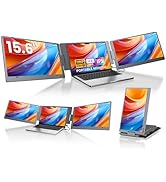
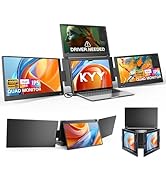
🚀 Triple your productivity, halve your desk clutter!
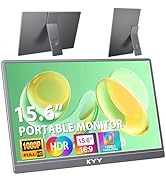
The KYY Laptop Screen Extender X90D is a portable 15.6" Full HD triple monitor designed for professionals on the move. Featuring a single Type-C cable plug & play setup, a durable CNC aluminum alloy chassis, and versatile 360° rotatable screens, it expands your laptop workspace by up to 300% efficiency. Compatible with Windows, macOS, and Android, this ultra-slim, lightweight extender fits laptops from 13" to 17" and delivers stunning 1080p visuals with wide viewing angles—perfect for multitasking, remote work, and travel.




| ASIN | B0DK6HJ1TB |
| Aspect Ratio | 16:9 |
| Best Sellers Rank | #3,599 in Electronics ( See Top 100 in Electronics ) #144 in Computer Monitors |
| Customer Reviews | 4.4 4.4 out of 5 stars (718) |
| Date First Available | October 19, 2024 |
| Image brightness | 300 Candela |
| Item Weight | 7.65 pounds |
| Item model number | X90D |
| Manufacturer | KYY |
| Product Dimensions | 12 x 17.3 x 3.74 inches |
| Resolution | 1920 x 1080 Pixels |
| Standing screen display size | 15.6 Inches |
| Total Usb Ports | 2 |
| Voltage | 5 Volts |
A**R
Great Price for a great product!
4 months now and Zero Issues, easy to set up, light weight very Compatible even with the phone, amazing picture quality for the cost and very functional. Easy to stow in a bag.
F**B
Total Game-Changer for Work and Travel!
I’ve been using the KYY 15.6” laptop screen extender for a few months now, and I honestly don’t know how I worked without it. If you need extra screens for productivity, travel, or even gaming—this is a solid pick. What I love: • Easy plug-and-play setup — Just connect with a single USB-C cable and it’s ready to go. No complicated installations. • Great picture quality — The 1080p Full HD display is sharp, bright, and looks fantastic from different angles. • Slim and lightweight — Perfect for tossing in a laptop bag. It folds up neatly and doesn’t take up much space. • Sturdy built-in stand — Makes it easy to adjust the viewing angle wherever you’re working. • Versatile — Works with laptops, phones, gaming consoles—pretty much anything with the right port. For the price, this screen is an amazing value. Whether you’re working from home, traveling, or just need more screen space, the KYY extender makes multitasking way easier. Highly recommend it for students, remote workers, or anyone on the go!
F**R
I was very pleasantly surprised. It actually works exactly as advertised.
I bought this for working with my higher end Samsung laptop, because my desktop machine has six monitors, so I'm definitely not going to get by with just one on my laptop. I have owned, for a very long time, a USB single cable monitor that, for what it is, is pretty good-- that is, it's very lightweight and portable, and it gets the video signal and power off of one (or two) USB connections. The problem with it though is that it is lower resolution and has a slower refresh rate. For my purposes at the time, using it in portrait mode for reference, it worked great. I was expecting a similar kind of experience here, but I was very wrong. This thing really is plug and play, provided your laptop provides adequate power over the USB-C, or you plug the monitor set into power separately. I believe there are drivers to install. Oh, yes! I'm glad I remembered this. The unit came with drivers on a USB drive but the USB drive they give you is actually very nice. It's metal and is both USB a and C and has a cover that flips around to either end, and that cover has a loop on it that is, thankfully, sized properly to go on to a keychain if you wanted to. Unfortunately, it's only 512 MB, yes, not gigabytes. The USB drive contains drivers for all of its compatible systems, including an APK for Android. I believe this is the same common driver set that you use with almost any USB monitor, including docking ports that have a video out. On my windows laptop, the monitors set up beautifully, though I was trying some funky things with providing power, and testing it through USB hubs and things like that, and my best advice is just not to get too adventurous with it. Plug it in, and if the monitors don't come on and stay on, then plug in their power source. On my system, somehow, and perhaps it's just dumb luck, I didn't even have to arrange the monitors within Windows, it just knew that these external monitors somehow were one on the left, and one on the right of the main display. Each of them is full HD. I didn't stress test them for refresh rates, but I think I read somewhere that the refresh rate is surprisingly high. That's not really an area I care about on something like this, because I really just want the footprint. The one slightly unpleasant surprise, if you can call it that, and really I don't know what I was expecting, but it's that this three panel thing, which is a display on either side, and then a structural panel in the middle that has a handle through it, really needs to sit on a flat surface, and it makes it a little janky if you want to use the laptop in an area other than at a table or desk. I know there are some solutions to this, like folding one of the monitors closed, and using the other freestanding in portrait mode. I think I was kind of hoping for something that actually attached to the laptop, so the whole thing felt like one unit. In any case, with the panels folded out, there is a stand on the back of the center panel that lets you tip the monitor set back to a pretty good angle that you would typically use a laptop at. I wouldn't say the panels are of the very highest quality, but for a very thin, USB only display, I will say the difference is not so noticeable as to be distracting, and that is comparing it to a Samsung Book 3 Pro which has a high-end Samsung display in it. You can see a clear color difference between the native monitor and the external panels, but that is due to the eye saver turning the display to a warmer color, but the effect is much more subtle on the externals.
M**E
Instant productivity in an extremely portable package
KYY Model X90G Triple 15.6” Monitor Review I’ve been using KYY’s dual 14” monitor for a couple of years and had great luck with it, so I decided to try their larger, triple-monitor X90G. There’s a lot to cover here, so stick with me. Packaging & Setup KYY does a great job with packaging, and this product was no exception. The monitor arrived securely in a sturdy retail box. Inside, everything was neatly organized: the monitor itself, all the necessary connection and power cables, and a USB drive with drivers (which I didn’t need for Windows 10 or 11). First Impressions The build quality is excellent. The aluminum frame, strong kickstand, and sturdy hinges keep the screens exactly where you want them. It’s a solid piece of equipment, and at just over 6 pounds, it isn’t something I’d want to carry around every day. However, it’s perfectly manageable for extended setups or car travel. Folded up, it looks like a slightly thicker laptop. Once opened, you’re surrounded by a massive amount of screen space. The Full HD resolution is sharp, with vibrant color. Display controls include a full suite of settings like HDR, blue light reduction, and several presets, including options for gaming. The menus are easy to navigate, and brightness can be adjusted directly without diving deep into settings. Although the 400-nit panel initially felt dim, I quickly found that 35% brightness was more than sufficient and actually more comfortable, especially when working close to the screens. Display Configuration & Use You can configure the monitors for use as a workstation or for presentations. I haven’t tested the presentation features, but I regularly use the wing monitors for programs like Outlook or Teams, while the top center screen is ideal for my primary work. It’s a seamless setup that complements my main monitor very well. Final Thoughts This is a thoughtfully designed tool that boosts productivity, adds flexibility, and makes multitasking much easier. It’s a solid investment if you're looking to expand your display space. Highly recommended.
Trustpilot
2 months ago
1 month ago